
FW Real Estate
Product Features
-
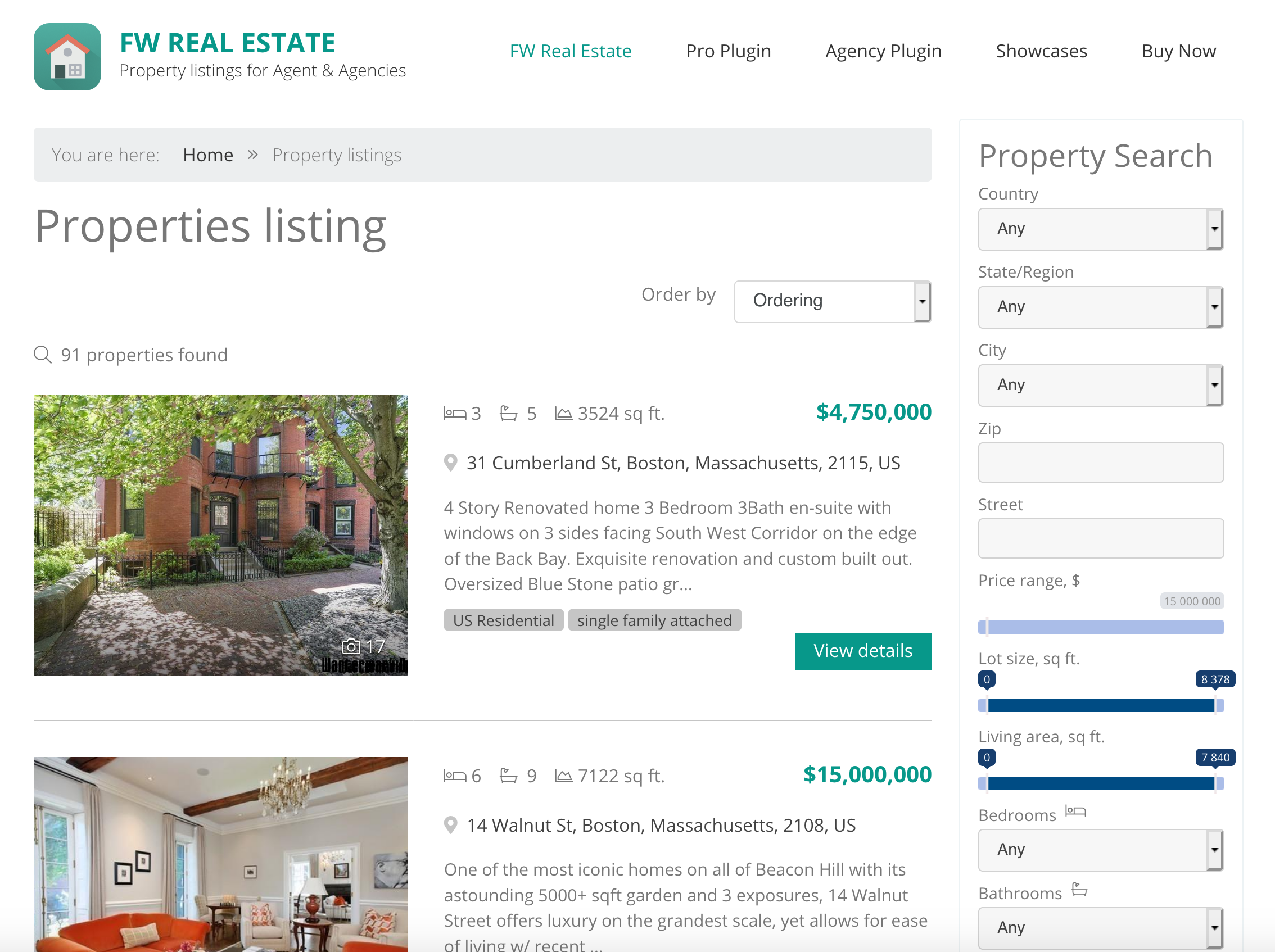 Responsive Property ListingsMobile friendly layouts for best performance and look on any device.List viewList property listings layout with numerous display options.Visual Featured BadgeProminent Featured badge overlaid on property cards in listings. Visitors instantly spot highlighted properties without reading descriptions.Customizable Status BadgesCreate unlimited status labels with custom names and colors. Sold, New, Under Offer, Price Reduced, Investment, or any custom status your market needs.Multi-Currency Price DisplayShow prices in USD, EUR, GBP, AED, and any ISO currency. Visitors select their preferred currency from a dropdown selector on every listing and property page.
 -
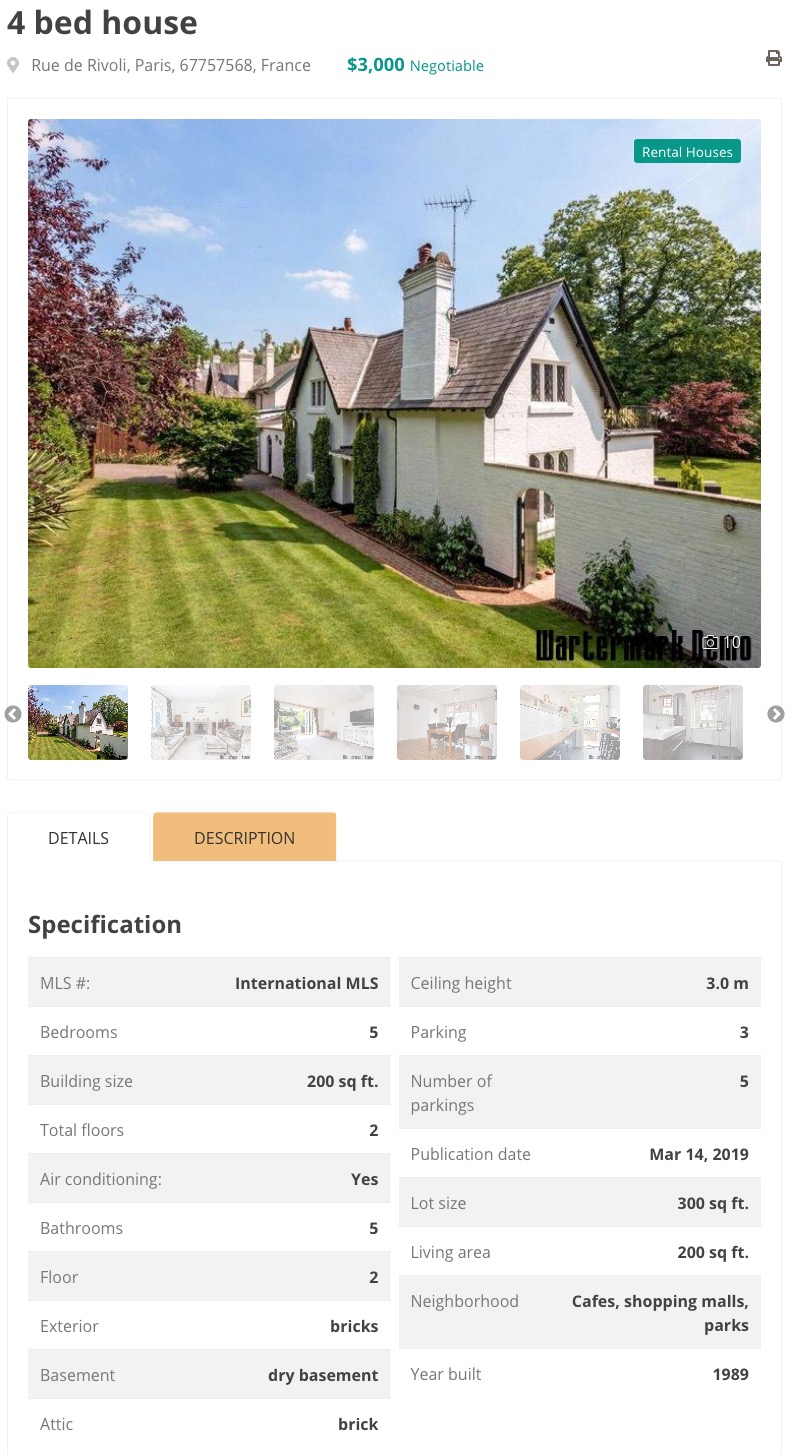 Image galleryHi-quality images resized for optimal use with originals kept.360-Degree Tour EmbeddingEmbed interactive panoramic tours and virtual walkthroughs on property detail pages. Works with Matterport, Kuula, iStaging, Zillow 3D Home or any provider that allows iframe embedding.Multi-Source Video EmbeddingEmbed videos from YouTube, Vimeo, or direct file upload (MP4, FLV). Also supports remote hosting via URL for videos on your own CDN.Unlimited Floor Plan UploadUpload unlimited floor plan images per property with custom titles like Ground Floor, Master Suite, or Basement. No limits on number, perfect for multi-level homes and commercial properties.Interactive Payment CalculatorReal-time mortgage payment estimates update as visitors adjust loan amount, down payment, interest rate, and term. Include property taxes, hazard insurance, and PMI for complete monthly cost picture.
 -
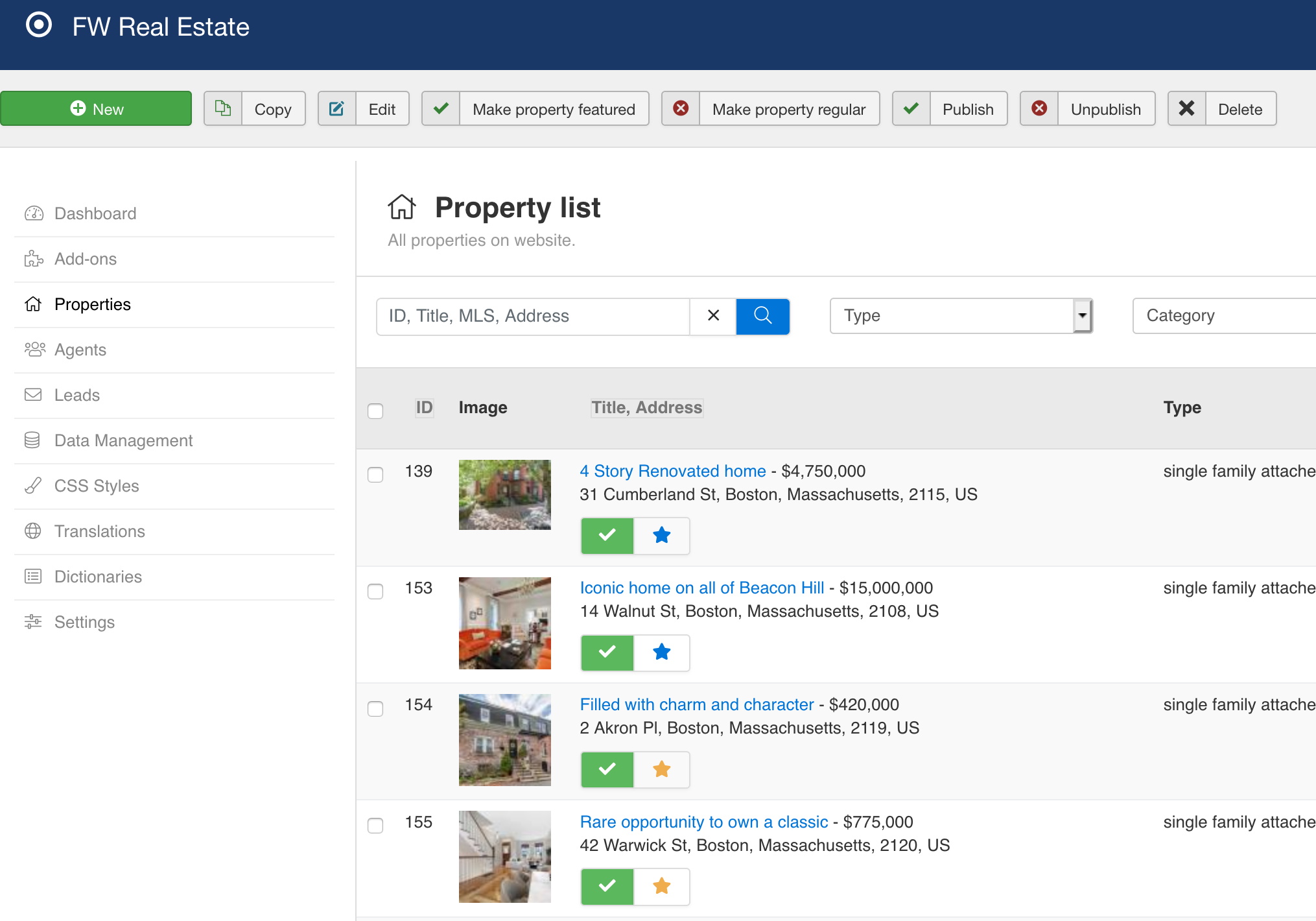 Batch uploadFast and handy files management with batch upload feature.Translation managerAdjust language interface translations to your needs or create translation for a new language.Admin Approval WorkflowAgent-submitted properties go to the standard admin queue for review. Optional email notifications alert admins to new submissions for quick approval.Complete Property Edit FormFull FW Real Estate edit form in the frontend. Category, type, pricing, location, metadata, gallery, all fields available to agents with the same controls as admins.
 -
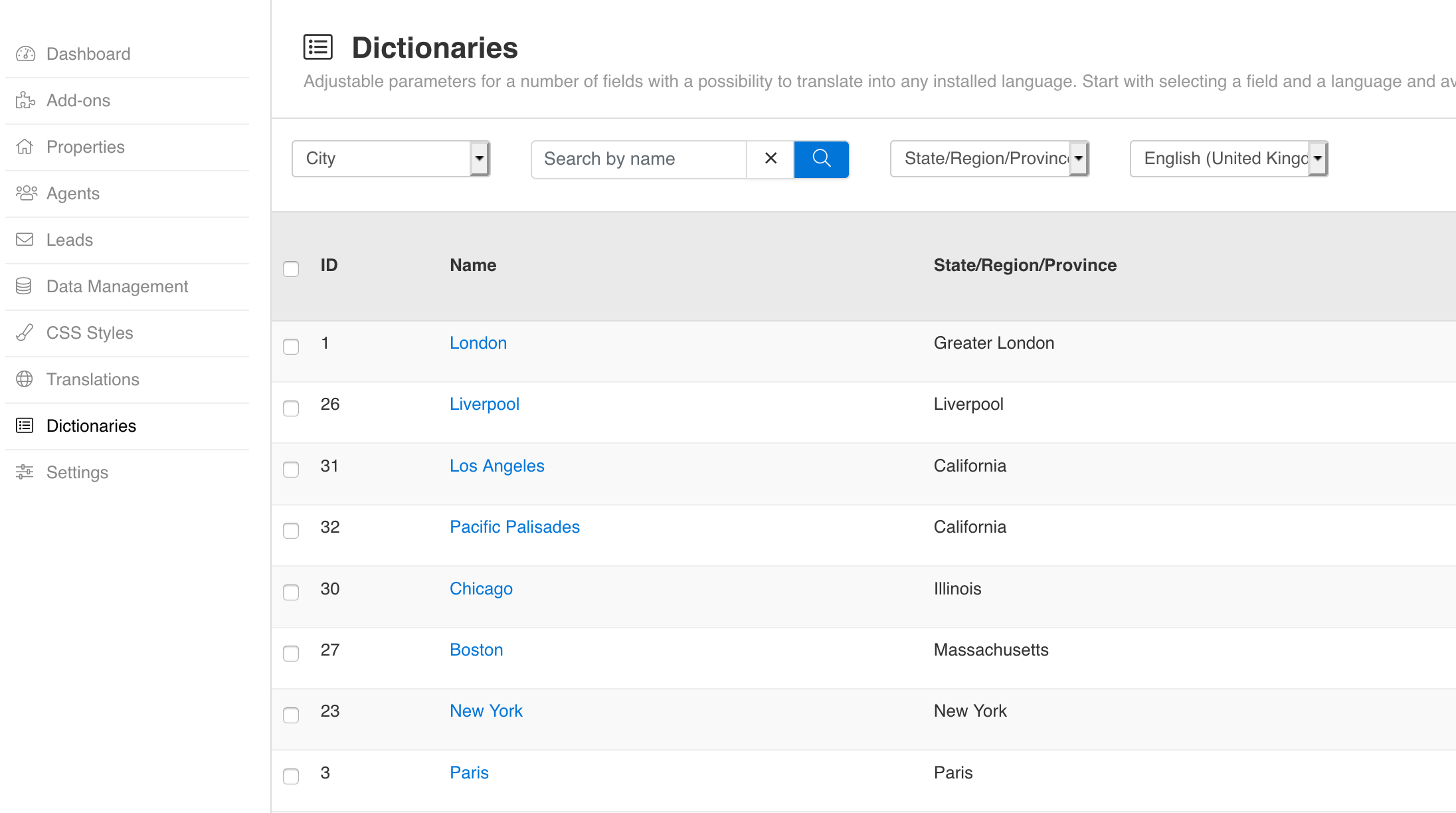 Dictionaries (customizable fields)10 special fields that can be edited, translated in any language and adjusted to your needs.Unlimited Field CreationBuild as many custom fields as your market demands. No quantity limits. Perfect for luxury homes, vacation rentals, commercial properties, or any specialized real estate niche.Structured Amenities DataComprehensive amenities checklist (pool, garage, air conditioning, balcony). Structured data instead of text descriptions lets visitors filter properties by specific features.Four Input TypesChoose from text input, dropdown select, multi-checkbox lists, and yes/no boolean toggles. Select and checkbox types support unlimited predefined options with translatable labels.Groups and Tabs OrganizationGroup related fields into logical sections and organize groups into tabs. Control display position with three zones: before details, after details, or additional sections.
Add-ons
-
 Free
Add a powerful property search form to any page on your real estate website with configurable fields, flexible layouts, and smart filtering.
Free
Add a powerful property search form to any page on your real estate website with configurable fields, flexible layouts, and smart filtering. Free
Put photos first. The Grid View add-on switches the default list to a card-based photo grid — three cards per row on desktop, adaptive on smaller screens, with all add-ons still working.
Free
Put photos first. The Grid View add-on switches the default list to a card-based photo grid — three cards per row on desktop, adaptive on smaller screens, with all add-ons still working. Solo Agent+
Display properties on interactive maps for location-driven property discovery. Let buyers search by distance, verify neighborhoods instantly, and explore listings geographically with Google Maps or Mapbox integration.
Solo Agent+
Display properties on interactive maps for location-driven property discovery. Let buyers search by distance, verify neighborhoods instantly, and explore listings geographically with Google Maps or Mapbox integration. Browse properties cinematically. Full-screen slideshow layout with auto-play and thumbnail navigation for immersive property exploration.
 IDX Realtor+
Embed property listings anywhere. Display full property browsing experience with search in any module position, article, or custom page.
IDX Realtor+
Embed property listings anywhere. Display full property browsing experience with search in any module position, article, or custom page. Free
Capture buyer inquiries on every property with built-in contact forms. All inquiries save to your admin Messages inbox and trigger an instant email notification.
Free
Capture buyer inquiries on every property with built-in contact forms. All inquiries save to your admin Messages inbox and trigger an instant email notification. IDX Realtor+
Create unlimited custom fields to capture any property data your market demands. Organize fields into groups and tabs, manage access by user role, and display them automatically on your property pages without coding.
IDX Realtor+
Create unlimited custom fields to capture any property data your market demands. Organize fields into groups and tabs, manage access by user role, and display them automatically on your property pages without coding. Solo Agent+
Visual status badges that tell buyers the market position of every property in seconds. Mark sold, new, price-reduced, and custom statuses with colored labels on listing cards.
Solo Agent+
Visual status badges that tell buyers the market position of every property in seconds. Mark sold, new, price-reduced, and custom statuses with colored labels on listing cards. IDX Realtor+
Expand global reach by showing prices in any currency. Automatic daily exchange rates from the European Central Bank let international buyers see properties in their preferred denomination.
IDX Realtor+
Expand global reach by showing prices in any currency. Automatic daily exchange rates from the European Central Bank let international buyers see properties in their preferred denomination. IDX Realtor+
Let your agents manage their own listings while you maintain complete control. Property Manager combines self-service flexibility with admin oversight, eliminating the bottleneck between agent submissions and live listings.
IDX Realtor+
Let your agents manage their own listings while you maintain complete control. Property Manager combines self-service flexibility with admin oversight, eliminating the bottleneck between agent submissions and live listings. IDX Realtor+
Display architectural layouts on property pages. Upload multiple floor plans with titles so buyers can explore room configurations before viewing.
IDX Realtor+
Display architectural layouts on property pages. Upload multiple floor plans with titles so buyers can explore room configurations before viewing. Solo Agent+
Connect property buyers with the right agent. Assign agents to properties, showcase professional profiles, and route inquiries directly to your team with automatic email notifications and an agent directory.
Solo Agent+
Connect property buyers with the right agent. Assign agents to properties, showcase professional profiles, and route inquiries directly to your team with automatic email notifications and an agent directory. Free
Adds rental filter and rental property type for properties. Allows showing price per month.
Free
Adds rental filter and rental property type for properties. Allows showing price per month. IDX Realtor+
Boost search visibility for every property listing with automatic SEO title generation and Google rich snippets. Customizable templates, structured data, and agent profile optimization.
IDX Realtor+
Boost search visibility for every property listing with automatic SEO title generation and Google rich snippets. Customizable templates, structured data, and agent profile optimization. IDX Realtor+
Add a date, time window, and notes to any property so buyers know exactly when they can visit. Open-house properties stand out in search results and on listing cards.
IDX Realtor+
Add a date, time window, and notes to any property so buyers know exactly when they can visit. Open-house properties stand out in search results and on listing cards. IDX Realtor+
Keep buyers engaged with smart search alerts. Saved searches drive return traffic through automatic email notifications when new properties match visitor preferences.
IDX Realtor+
Keep buyers engaged with smart search alerts. Saved searches drive return traffic through automatic email notifications when new properties match visitor preferences. IDX Realtor+
Add investment-focused fields to properties. Track amenities, financial metrics, and rental income with structured data that buyers can search.
IDX Realtor+
Add investment-focused fields to properties. Track amenities, financial metrics, and rental income with structured data that buyers can search. IDX Realtor+
Pin your best properties to the top. Mark any property as featured and it automatically appears first in all listings with a prominent badge.
IDX Realtor+
Pin your best properties to the top. Mark any property as featured and it automatically appears first in all listings with a prominent badge. Solo Agent+
Help buyers build their shortlist with one click. Logged-in visitors save any property to their personal Favorites page and pick up exactly where they left off — on any device.
Solo Agent+
Help buyers build their shortlist with one click. Logged-in visitors save any property to their personal Favorites page and pick up exactly where they left off — on any device. Solo Agent+
Help buyers decide faster with side-by-side comparison tables. Select up to 4 properties and see prices, features, and amenities aligned in one view.
Solo Agent+
Help buyers decide faster with side-by-side comparison tables. Select up to 4 properties and see prices, features, and amenities aligned in one view. IDX Realtor+
Every brochure download is a captured lead. Add a Download button to any property, collect contact details, and let the add-on email the PDF to the buyer and notify your whole team automatically.
IDX Realtor+
Every brochure download is a captured lead. Add a Download button to any property, collect contact details, and let the add-on email the PDF to the buyer and notify your whole team automatically. Free
Embed property walkthrough videos from YouTube, Vimeo, remote files, or uploaded MP4. Each property features one video with optional custom cover images.
Free
Embed property walkthrough videos from YouTube, Vimeo, remote files, or uploaded MP4. Each property features one video with optional custom cover images. Free
Interactive 360-degree property tours that keep buyers engaged. Embed virtual walkthroughs from Matterport, Kuula, iStaging, or any embed-compatible tour service.
Free
Interactive 360-degree property tours that keep buyers engaged. Embed virtual walkthroughs from Matterport, Kuula, iStaging, or any embed-compatible tour service. Solo Agent+
Turn property pages into shareable content. Visitors share listings on Facebook, X, LinkedIn, and email with one click, driving organic traffic through their networks.
Solo Agent+
Turn property pages into shareable content. Visitors share listings on Facebook, X, LinkedIn, and email with one click, driving organic traffic through their networks. IDX Realtor+
Transfer your entire property catalog with one file. Export all listings to CSV, edit prices, statuses, and any field in Excel or Google Sheets, then import back — complete with gallery images, multi-language translations, and automatic lookup value creation.
IDX Realtor+
Transfer your entire property catalog with one file. Export all listings to CSV, edit prices, statuses, and any field in Excel or Google Sheets, then import back — complete with gallery images, multi-language translations, and automatic lookup value creation. Solo Agent+
Showcase properties in any module position. Display newest, most popular, or random listings with vertical, horizontal, or slideshow layouts.
Solo Agent+
Showcase properties in any module position. Display newest, most popular, or random listings with vertical, horizontal, or slideshow layouts. IDX Realtor+
Help buyers understand affordability instantly. Interactive mortgage calculator with amortization schedule estimates monthly payments.
IDX Realtor+
Help buyers understand affordability instantly. Interactive mortgage calculator with amortization schedule estimates monthly payments. Solo Agent+
Showcase your agent team everywhere. Display agent profiles in any module position with flexible layouts and smart filtering.
Solo Agent+
Showcase your agent team everywhere. Display agent profiles in any module position with flexible layouts and smart filtering. Free
The free official design template for FW Real Estate. Complete styled layouts for listings, property details, agent profiles, and all plugin features out of the box.
Free
The free official design template for FW Real Estate. Complete styled layouts for listings, property details, agent profiles, and all plugin features out of the box. Connect FW Real Estate to 200+ US MLS boards through MLS Grid — the broadest RESO Web API aggregator in North America. Import and sync listings automatically using modern OAuth 2.0 credentials.
Connect FW Real Estate to Trestle by CoreLogic — a nationwide RESO Web API platform covering residential, commercial, and rental listings across the US. OAuth 2.0 authentication, multi-class import, full RESO Data Dictionary support.
Connect FW Real Estate to Spark API by FBS — the RESO Web API platform used by FBS-powered MLS boards across the US. Paginated OData imports, automatic photo downloads, and cron-based batch sync.
Connect FW Real Estate to 200+ US MLS boards through MLS Grid — the broadest RESO Web API aggregator in North America. Import and sync listings automatically using modern OAuth 2.0 credentials.
Connect FW Real Estate to Trestle by CoreLogic — a nationwide RESO Web API platform covering residential, commercial, and rental listings across the US. OAuth 2.0 authentication, multi-class import, full RESO Data Dictionary support.
Connect FW Real Estate to Spark API by FBS — the RESO Web API platform used by FBS-powered MLS boards across the US. Paginated OData imports, automatic photo downloads, and cron-based batch sync. -
Free
Add a powerful property search form to any page on your real estate website with configurable fields, flexible layouts, and smart filtering.
Free
Put photos first. The Grid View add-on switches the default list to a card-based photo grid — three cards per row on desktop, adaptive on smaller screens, with all add-ons still working.
Free
Capture buyer inquiries on every property with built-in contact forms. All inquiries save to your admin Messages inbox and trigger an instant email notification.
Free
Adds rental filter and rental property type for properties. Allows showing price per month.
Free
Embed property walkthrough videos from YouTube, Vimeo, remote files, or uploaded MP4. Each property features one video with optional custom cover images.
Free
Interactive 360-degree property tours that keep buyers engaged. Embed virtual walkthroughs from Matterport, Kuula, iStaging, or any embed-compatible tour service.
Free
The free official design template for FW Real Estate. Complete styled layouts for listings, property details, agent profiles, and all plugin features out of the box.
-
Solo Agent+
Showcase your agent team everywhere. Display agent profiles in any module position with flexible layouts and smart filtering.
Solo Agent+
Connect property buyers with the right agent. Assign agents to properties, showcase professional profiles, and route inquiries directly to your team with automatic email notifications and an agent directory.
Solo Agent+
Help buyers decide faster with side-by-side comparison tables. Select up to 4 properties and see prices, features, and amenities aligned in one view.
Solo Agent+
Help buyers build their shortlist with one click. Logged-in visitors save any property to their personal Favorites page and pick up exactly where they left off — on any device.
Solo Agent+
Showcase properties in any module position. Display newest, most popular, or random listings with vertical, horizontal, or slideshow layouts.
Solo Agent+
Display properties on interactive maps for location-driven property discovery. Let buyers search by distance, verify neighborhoods instantly, and explore listings geographically with Google Maps or Mapbox integration.
Solo Agent+
Turn property pages into shareable content. Visitors share listings on Facebook, X, LinkedIn, and email with one click, driving organic traffic through their networks.
Solo Agent+
Visual status badges that tell buyers the market position of every property in seconds. Mark sold, new, price-reduced, and custom statuses with colored labels on listing cards.
-
Solo Agent+
Showcase your agent team everywhere. Display agent profiles in any module position with flexible layouts and smart filtering.
Solo Agent+
Connect property buyers with the right agent. Assign agents to properties, showcase professional profiles, and route inquiries directly to your team with automatic email notifications and an agent directory.
Solo Agent+
Help buyers decide faster with side-by-side comparison tables. Select up to 4 properties and see prices, features, and amenities aligned in one view.
IDX Realtor+
Transfer your entire property catalog with one file. Export all listings to CSV, edit prices, statuses, and any field in Excel or Google Sheets, then import back — complete with gallery images, multi-language translations, and automatic lookup value creation.
IDX Realtor+
Create unlimited custom fields to capture any property data your market demands. Organize fields into groups and tabs, manage access by user role, and display them automatically on your property pages without coding.
IDX Realtor+
Add investment-focused fields to properties. Track amenities, financial metrics, and rental income with structured data that buyers can search.
Solo Agent+
Help buyers build their shortlist with one click. Logged-in visitors save any property to their personal Favorites page and pick up exactly where they left off — on any device.
IDX Realtor+
Pin your best properties to the top. Mark any property as featured and it automatically appears first in all listings with a prominent badge.
IDX Realtor+
Display architectural layouts on property pages. Upload multiple floor plans with titles so buyers can explore room configurations before viewing.
Solo Agent+
Showcase properties in any module position. Display newest, most popular, or random listings with vertical, horizontal, or slideshow layouts.
IDX Realtor+
Embed property listings anywhere. Display full property browsing experience with search in any module position, article, or custom page.
Solo Agent+
Display properties on interactive maps for location-driven property discovery. Let buyers search by distance, verify neighborhoods instantly, and explore listings geographically with Google Maps or Mapbox integration.
IDX Realtor+
Help buyers understand affordability instantly. Interactive mortgage calculator with amortization schedule estimates monthly payments.
IDX Realtor+
Expand global reach by showing prices in any currency. Automatic daily exchange rates from the European Central Bank let international buyers see properties in their preferred denomination.
IDX Realtor+
Add a date, time window, and notes to any property so buyers know exactly when they can visit. Open-house properties stand out in search results and on listing cards.
IDX Realtor+
Every brochure download is a captured lead. Add a Download button to any property, collect contact details, and let the add-on email the PDF to the buyer and notify your whole team automatically.
IDX Realtor+
Let your agents manage their own listings while you maintain complete control. Property Manager combines self-service flexibility with admin oversight, eliminating the bottleneck between agent submissions and live listings.
IDX Realtor+
Keep buyers engaged with smart search alerts. Saved searches drive return traffic through automatic email notifications when new properties match visitor preferences.
IDX Realtor+
Boost search visibility for every property listing with automatic SEO title generation and Google rich snippets. Customizable templates, structured data, and agent profile optimization.
Solo Agent+
Turn property pages into shareable content. Visitors share listings on Facebook, X, LinkedIn, and email with one click, driving organic traffic through their networks.
Solo Agent+
Visual status badges that tell buyers the market position of every property in seconds. Mark sold, new, price-reduced, and custom statuses with colored labels on listing cards.
Services
 Theme Integration
 Languages


Subscription Plans
After subscription expires, the product and all its add-ons remain functional and can be used further.
-
Update period1 y
-
Update period1 mo
-
Update periodLifetime
-
Add-ons16
-
Websites1
-
MLS integration
-
Technical supportOn-site
-
Support response24h
-
Lifetime usage
-
Update period1 y
-
Update period1 mo
-
Update periodLifetime
-
Add-ons29
-
Websites1more on checkout
-
MLS integration
-
Technical supportOn-site
-
Support response24h
-
Lifetime usage
-
Update period1 y
-
Update period1 mo
-
Update periodLifetime
-
Add-ons29
-
Websites3more on checkout
-
MLS integration
-
Technical supportOn-site
-
Support response24h
-
Lifetime usage
-
Free setup service
Frequently Asked Questions
-
Is FW Real Estate a free plugin?
Yes. The core is free and always has been: download it from the FW Real Estate product page on fastw3b.com, pick the package for your platform, agree to the terms and install that one file. There is nothing to buy first and no account needed to get it.
What a paid subscription adds is add-ons. The core covers properties, fields, dictionaries and the front end on its own, and a great many sites never need more than that.
-
How are add-ons installed?
Automatically. Install the core package for your platform, then connect the site to your fastw3b.com account, and every add-on you are entitled to is downloaded and switched on for you. There is no per-add-on Install button, and nothing to download by hand.
To connect, click Connect in the FW Real Estate admin header. The lock icon and the red This website is not verified text beside it do the same thing, and the Add-ons screen offers the same action as Connect to install. It is one click: your fastw3b.com client section opens, the store registers this website and sends the key straight back, and the admin returns already verified. There is nothing to copy and no key to paste.
From that moment the free add-ons and whatever your subscription covers install and enable themselves. The only manual actions afterwards are enabling, disabling and updating; add-ons cannot be deleted, so one you do not want is simply left disabled.
-
Why do I need to verify my website?
Connecting pairs this site with your fastw3b.com account. It is what makes the following possible:
- Receiving your add-ons. Everything your subscription covers is installed and enabled automatically the moment it succeeds.
- Getting updates, both for the core and for the add-ons.
- Support through the Client Section at fastw3b.com.
One button does it: Connect, in the FW Real Estate admin header. It opens your client section, registers the site and brings the key back by itself.
Free add-ons come with connecting alone, no subscription required. An unconnected site keeps working, but it receives no add-ons and is offered no updates.
-
What are add-ons?
Add-ons are extensions that work only with FW Real Estate and add to what it can do. They come in three kinds: plugins (features such as maps, agents, favourites or rentals), designs (how the front end looks) and modules (blocks you can place on a page).
They are not Joomla extensions or WordPress plugins and will not appear in your platform's own extension or plugin manager. They live inside FW Real Estate and are managed from its Add-ons screen.
-
Why would I need an add-on?
FW Real Estate is self-sufficient on its own: the core holds everything a property site cannot work without. Every other feature is an add-on, so that each site carries only what it actually uses.
That split is also why disabling an add-on is clean. Turn one off and its fields, its output and its columns disappear from the site; turn it back on and they return with the data intact.
-
How to get an add-on?
Connect your website to your fastw3b.com account, using the Connect button in the FW Real Estate admin header. The add-ons your subscription covers are then downloaded and enabled on their own, and the free ones come with connecting by itself.
If the add-on you want is not among them, it needs a subscription that covers it. Take out or extend one on fastw3b.com and it will arrive automatically on a later visit to the admin, with nothing to download or install by hand.
Everything the site has received is listed under Admin, FW Real Estate, Add-ons, where you can enable, disable and update each one. Add-ons cannot be deleted: an add-on you do not want is simply left disabled.
12k+ clients love our product
If you can dream it, Fastw3b will design it. It is almost a year since I started working with Fastw3b. In fact, having started on the Joomla journey (three months prior) and with no development experience, Fastw3b was the perfect first date.
After the initial – dancing around – trying to understand each other, we quickly established a relationship based on frankness and directness and this was probably the single most important trait that I respect them for. It would have been easier to repeat the “customer is king” mantra and get paid for the job. Not with Fastw3b. It seemed as if they genuinely were as interested and excited about the project as I was. It was as if I was working with my own inhouse team, rather than distant consultants.
If you are new to Joomla or indeed to development and are looking for a professional yet empathetic partner, I highly recommend Fastw3b. They deliver on time, are willing to own-up to errors and fix them, and best of all are as invested in your project as you.

Solid extension with great support
Functionality. This extension had every function available that my client requested and a lot more too.
Ease of use. Even a beginner could configure it right out of the box.
Support. If I could score them 110 here I would. The support has been fantastic, even though I am on the other side of the world.
Documentation. Documentation is a little thin, but the support makes up for it.
Value for money. Yup. Definitely worth it. Going to have them install IDX integration next.

Perfect !
Perfect and great support. Help, trust and safe. Thank you all

FW Real Estate - EXCELLENT !!!
I recently bought the extension FW Real Estate, to build a project were the goals of the estensão it claims to do. And to my surprise, the project is being built surpassing my expectations.
Support is fast, simple and very objective: Fantastic!
I recommend everyone this robust extension!
CONGRATULATIONS TO ITS DEVELOPERS AND SUPPORT YOUR TEAM!

Excellent component
We used some of Real Estate components for Joomla. We pay money and in most of cased we do not received a good component and good support.
But we found this component and for low money (it`s really very low money) we received a excellent Real Estate component with very very good support.
So - I recommend use this Real Estate component - it`s very cheaper, very good quality, very good support, and very easy to use it for building a real estate site.
The criteria for any successful project is for it to be on time, within budget and meets business and customer requirements. In order to achieve this you need a highly skilled team who are knowledgeable efficient in what they do and prepared to go the extra mile to ensure that the required work is completed to the highest quality. It is for this reason that I partner with Fastw3b as I can rely on them to always deliver a successful project.
The strongest skill of Fastw3b is their ability to develop and deliver innovative technical solutions whilst always ensuring a high level of customer service.
I believe it is the willingness of Fastw3b to collaborate with a client during the project initiation phase by providing suggestions and advice on how to best solve a problem to ensure that a quality product and service is delivered.

Great component and support
I have been using this component for about 2 years now. Everything works perfectly. Recently I migrated to a new Joomla! website and installed the new component, something wasn't right and the support desk of FW helped me fast and good.
Couple of years ago when I wanted to redesign my art website I was looking for an easy to navigate and attractive picture gallery component with Lightbox effect and have found Fastw3b Gallery. With some customization of the FW Gallery extension I was able to showcase my extensive art and photography collection with specific information I needed in a clean, contemporary style. This is a well organized, expandable structure with many features.
I could count on expert advise regarding website development, customization or upgrade questions, reliable communication and delivering work by schedule.

Why do you choose Fastw3b as provider for your projects?
At the time I selected Fastw3b, you offered what appeared to be the best Real Estate component for Joomla at a reasonable price.
What do you think is our strongest skill as a company?
I am very satisfied with your customization services. I have hired your team numerous times for FW Real Estate customization for one of my clients.
I appreciate the personal service and quick attention to issues that I’ve experienced with your customization services.

Guides and updates



FW Real Estate Changelog
Version 7.1.17 (14 Oct 2026)
Version 7.1.17, a hotfix: 1 fix.
Bugfix: Property links in emails open again. The link to the property in an inquiry email, the auto-reply, the brochure follow-ups and a shared listing now carries your website's address, so it opens from any mail program.
Version 7.1.16 (13 Oct 2026)
Version 7.1.16, a hotfix: 2 fixes.
Bugfix: Property views are counted again. Each visit to a property page adds one to its Hits count in the Properties list, including visits your site answers from its page cache. A quick view doesn't count as a visit.
Bugfix: Map coordinates and other add-on fields save when you edit a translation. Latitude and longitude, Featured, the rental and investment figures, the video, the 3D tour and the extra fields now keep what you enter while editing a listing in another language, as they do in the default language.
Version 7.1.15 (12 Oct 2026)
Version 7.1.15, a hotfix: 2 fixes.
Bugfix: The House type list closes after you pick a type. On the property form, in the back office and on the front editor, the House type list stayed open after a pick until you pressed Esc. It now closes as soon as you pick, and you can open it again to add a second type.
Bugfix: The property list's pager takes you to the top of the new page. After you picked another page under the property list, the new properties loaded but the view stayed at the bottom, by the pager, so you had to scroll up to see them. The page now opens at the top of the results. Changing a search filter still leaves the view where it is.
Version 7.1.14 (12 Oct 2026)
Version 7.1.14: 3 fixes.
Bugfix: New properties lead the property list again. On a site upgraded from version 6, a property added since the upgrade showed at the bottom of the back-office list. It now shows at the top, newest first, ahead of the properties you've put in order by hand.
Bugfix: The Editing language switch reads the same everywhere. Every language is now named in your admin language, like "Dutch (Netherlands)", and the site's main language is marked "(default)". The language you're editing shows its flag beside the switch and at the start of the line under it. On edit forms the switch now sits in the header, just before Save. There, and on list screens, the "Editing language" label shows as a tooltip, so the screens stay tidy.
Bugfix: Editing in a second language no longer loses your changes. When you edited a listing, a dictionary value or an agent in another language, the price, categories, contact details and other values that are the same in every language were thrown away while the screen still said "saved". They're now saved from any language, every multilingual screen has a labelled Editing language switch with a line that says which language you're editing and what a save keeps, and switching with unsaved changes asks first. On WordPress the chosen language now lasts until you log out, as it does elsewhere.
Version 7.1.13 (10 Oct 2026)
Version 7.1.13, a hotfix: 1 update, 1 fix.
Update: House type and category come first in the property form. On the property form's Property Info card, the type and category now sit at the top, above bedrooms and bathrooms, in the admin and in the front-end submission form alike.
Bugfix: Province and city lists are alphabetical again. On the property form, the region and city dropdowns that fill in after you pick a country or a region now list places by name, in the admin and on the front-end submission form.
Version 7.1.12 (10 Oct 2026)
Version 7.1.12, a hotfix: 4 fixes.
Bugfix: Property photos open faster. The page loads the first photo and small previews, and fetches the rest as you browse.
Bugfix: Photos you upload together keep their file-name order. Photo 2 now comes before photo 10, on the property form and on the agent's own edit form.
Bugfix: The update notice goes away once the update is in. Right after you install an update from the dashboard, the Notifications card and the admin menu badge no longer say an update is waiting.
Bugfix: The dashboard and the header agree about updates. The Notifications card now says an update is available only when the version shown in the header has one, on every screen and right after an update.
Version 7.1.11 (09 Oct 2026)
Version 7.1.11, a hotfix: 1 fix.
Bugfix: Upgrading from 6.x keeps your fields visible. Field access from 6.x now carries over correctly, and saving a property no longer clears a field you couldn't see.
Version 7.1.10 (09 Oct 2026)
Version 7.1.10, a hotfix: 1 fix.
Bugfix: Addresses no longer start with "0,". A site moved from version 6 showed a street number of 0 on houses that never had one, in the admin list and on the site. An empty or zero street number is now left out. The admin property list also shows the MLS number before the address again, as version 6 did, whenever the MLS field is published.
Version 7.1.9 (08 Oct 2026)
Version 7.1.9: 2 fixes.
Bugfix: Your own styling shows on the site again. The custom styles you save on the Styles screen were kept, but they weren't added to your pages, so your own rules (including ones kept from 6.x) stopped applying after the move to 7.
Bugfix: Edit on the Translations screen opens the language again. On some sites it showed "Unknown screen" instead of the editor, so you couldn't change any wording from the admin.
Version 7.1.8 (08 Oct 2026)
Enquiries get through again after an update from version 6, and leads are easier to work with.
reCAPTCHA works with the keys you already have. A new reCAPTCHA type setting offers Invisible (the default, for v3 and invisible keys) or Checkbox. Version 7 drew a checkbox, which Google refuses for invisible and v3 keys, so enquiries failed their check.
Enter your reCAPTCHA keys in Configuration. The site key and the secret key are fields under Configuration, General, Captcha. The secret stays hidden once it's saved; leave the field empty to keep it.
Every lead shows its property. The Leads list and the opened message show the property's ID, linked to its edit screen, and its reference number under the label your site gives that field.
Opened leads stay read after the update. Leads you'd already opened before the update no longer come back as unread.
Links look like links again. Names in the admin lists are blue, and only unread leads are bold, with a red dot.
Clear the Joomla cache after updating. If page caching is on, open System, Clear Cache, so visitors get the new enquiry form straight away.
Version 7.1.7 (05 Oct 2026)
Searches remember what your visitors chose.
Sorting carries on to the next page. A visitor who sorts the results and moves to page 2 sees the same order there.
Back brings the search back. After Back or a reload, the price range and the ticked regions are the way the visitor left them, and the list doesn't say that 0 properties match.
Search works from every menu link. A page opened through a plain index.php?Itemid= link now searches and sorts without landing on an unknown page.
No more "$0" prices. A price too small to show after a currency conversion now shows your no-price text.
Update your search add-ons too. Hungarian Houses, Official, Superior Bay and the search module have matching updates in this release.
Version 7.1.6 (30 Sep 2026)
Moving your Joomla site up from version 6 is now smooth: your pages, links and messages come with you.
Nothing gets lost in the move. Every enquiry your visitors sent you is still there after the upgrade, with its name, e-mail and message. Brochure PDFs you uploaded stay on their properties, ready to download.
Your links keep working. Property pages, search results and menu pages open at the same addresses as before, so bookmarks, e-mails you've sent and search engines still find them.
Pages look the way you set them up. Page titles, headings, currencies and page numbers show just as they did, and the search box stays on the page it belongs to.
Live search works with page caching on. If you use Joomla's page cache to speed up your site, every visitor can still search.
News from us on your dashboard. When there's something your site should know about, you'll see it as a card you can close.
Update your add-ons at the same time. Several add-ons have matching updates in this release.
Version 7.1.5 (20 Sep 2026)
A release about backups that land on a different site, updates that say what they need, and a search panel that follows the page it sits on.
A backup restores into a site whose structure differs. A backup taken from a site that has been through earlier upgrades now restores into a newer or older one: each row is fitted to the table it arrives in, and the report says what was adjusted.
A backup describes the property data and nothing else. The site's own standing with the store stays behind, so a restored copy verifies itself instead of inheriting another site's key. A media backup leaves the backups folder out, so it no longer carries every earlier backup inside itself.
A backup without media is a compressed archive. On a test site 687 KB of data became a 45.8 KB file. Backups written by earlier versions are still listed and restored.
Updates say what they need. On a site that is not connected yet, the update window shows the new version, says that updates install on verified websites, and offers Connect. An add-on's Update button starts the same step.
The search module follows the page it is on. A menu item limited to a region, a city or a type shows those choices ticked and fixed in the module placed beside it, and a visitor's own filters apply within them. A module placed on a filtered page also shows the visitor's current picks.
Range fields can be two lists instead of a slider, with the highest value the site holds as the last entry in the To list, kept while the results recount or the currency changes.
The Minimal search layout can carry your own background image, chosen in the media manager, and its own photo is kept when none is chosen.
Settings a layout does not use are hidden in the module's settings, with one line saying why and the values kept for a layout that reads them.
Currency, date format and units follow the active design, and a design that sets units names them in a way every site can read.
Update your add-ons together with this version. The search module, Compare and the contributor form read what this version provides.
Version 7.1.4 (18 Sep 2026)
A release that helps a new site get started, and keeps add-on data where it belongs.
First steps on the dashboard. A new site is guided through three numbered steps: choose your market, which sets area and length units, currency and date format; add demo data or your first property; and put the property pages on a site menu. Each step is marked when it is done. The card folds away while a step is left and can be hidden once every step is done, and hiding it asks first.
Demo data in one click. Twelve example properties with photos, added and removed with one button, in the units of the market you chose. Removing them leaves your own properties untouched.
A Site menu card creates menu items for the property list, a single property and the pages your add-ons offer, and shows which of them are already on the chosen menu.
An updated site is recognised. A site updating from an earlier version has its market read from its own properties, so it is not asked to set up again and none of its settings are changed.
A switched-off add-on stays switched off. Its data is no longer shown on property pages and cards or used by search, filters and counts, and enquiries are not sent to agents while the Agents add-on is off.
Saving a property keeps your add-on data. Saving while an add-on is off no longer clears that add-on's fields, and a property's number of units is kept.
A property's status has one source. Status labels, comparison, saved-search alerts and the contributor form read it from the same place, so a listing withdrawn by an importer shows its new status everywhere.
Updating from the previous version. Three alert tables are moved onto this version's structure during the update, so it no longer reports differences in them; pages and modules limited to a region, city or type keep their selection after an update that had to be finished in stages.
Backup and restore get enough time on large sites and never lower a limit your host has set higher. A restore file larger than the server accepts is stopped before it is sent, with a message naming the size, the limit and where to copy the file instead.
Empty lists explain themselves and offer the next step, and area labels carry no guessed unit until a market is chosen.
Migration results on the dashboard. When an update leaves something to check, the dashboard says what to look at and offers a Copy log button for a message to support, instead of showing the raw log.
Update your add-ons together with this version. Several add-ons now save and read their own data, and their new versions need this one. An add-on left at its previous version keeps its existing values, but changes to its fields are not saved, statuses may not show in it, and enquiries do not reach agents until it is updated.
Version 7.1.3 (13 Sep 2026)
A maintenance release. It carries the engine changes of this version, and two that belong to this platform.
Your existing data is copied across reliably when you upgrade. An unusual value in a date field could stop the copy part way, leaving a site whose lists were all empty with nothing on screen to explain it. Nothing was ever lost: the data stayed in the previous version's tables. The copy now reads those values as they are and no longer depends on how strictly your database server is configured.
And if a copy does not finish, the dashboard says so and can finish it. It shows how many properties are still in the previous version's tables and how many have arrived, states that the data is not lost, and offers a button that copies it across in stages, so a large catalogue completes rather than running out of time. It can be pressed again at any point and never copies a record twice.
The installation log is readable from the dashboard. The record of what an update did is written to a file that cannot be opened from a browser, by design, which left it available only to someone with FTP access. The dashboard now shows the end of it directly on the page when there is something to explain.
An incomplete package now reports itself. If part of the package is missing, the installer says so on screen instead of finishing quietly with the database untouched.
A module's Layout setting lists the layouts that exist. Choosing a layout for a module is now a list of the layouts actually available to it rather than a free text box.
Your own currencies are kept when you upgrade, with their own exchange rates, rather than being replaced by the defaults.
The date switches in the Fields list reach the property page, and a comparison table and the spreadsheet importer show only your own fields rather than also those belonging to an add-on.
The enquiry e-mail lists only the details a property has, and the default e-mail templates have been revised.
A restore that has nothing to add says so. Restoring a previous-version backup into a site that already holds properties now reports that nothing was imported, and applies none of the backup's users, settings or media.
The property edit forms have been corrected.
The search module's field settings take effect. A field switched off in the module settings is now hidden on the site, and the settings show the fields as they appear. Modules saved earlier keep the fields their settings showed.
Version 7.1.2 (10 Sep 2026)
A maintenance release. It carries the engine changes of this version, and one that belongs to this platform.
Long lists work again. A list of properties, messages or dictionary terms that ran to more than one page could not be paged, and switching a property between published and unpublished from the list ended on a permission error although the change had been made. Both are fixed.
The enquiry form says Street and Post code, in place of an internal code, in all fifteen languages.
Settings show the value that is actually in force, rather than an empty box for a setting that had never been saved and was quietly using its default.
The admin menu module loads its stylesheet with a version. Its appearance could survive an update in a browser that had cached the previous file. It now changes when the module does.
A map keeps its markers while you narrow a search, the search panel offers only the fields your installation can answer, and the add-ons screen no longer shows counters that use one word for two different things.
Deleting a property removes everything that belonged to it, its images included.
Fixes to how a backup is collected. What a backup contains has been corrected, and what the screen says about it now describes what the button does.
Nothing else changes. No setting moves, no content is rewritten, and a site that was working before works the same way after.
Version 7.1.1 (02 Sep 2026)
A maintenance release for the component. Nothing it changes is visible on a page, and there is nothing to adjust after installing it.
Template names are validated before they are used. A template is chosen by name, and some of those names are assembled from settings a page carries. The name is now checked to be a name, so one that has been tampered with resolves to nothing instead of to a file. Every template a design or an add-on actually ships is unaffected: the check describes the shape they already have.
Submitted values are cleaned as they arrive. Text that a form sends is stripped of markup at the point it is read, in one place, rather than at each of the places that use it. Fields written in the rich-text editor are the exception, and they keep what the editor produced: a property description keeps its formatting, its links and its tables. Nothing was added to what that filter allows, because nothing needed to be: the video and the virtual tour a listing shows are built when the page is drawn, from the address stored with the property, and were never part of the description's own text.
Nothing else changes. No setting moves, no data is rewritten, and a site that was working before is working the same way after.
Version 7.1.0 (02 Sep 2026)
Nothing in this release changes what the component does. Files moved; behaviour did not. Every page renders what it rendered before and every setting means what it meant.
What moved: the markup for a feature now lives with the feature rather than in the design, so an add-on brings its own appearance with it and a design no longer has to know about every add-on that might be installed.
A design still has the last word, and a site that has customised one keeps every customisation. If the design offers its own version of a template, that version is used exactly as before; the add-on's copy is consulted only after the design and its parents have been asked. Updating the component replaces its files and removes none, so templates already on your site stay where they are and keep being used.
⚠️ Update the component before the add-ons. An add-on published alongside this release carries its own templates and needs the core that knows to look for them. The catalogue will not offer such an add-on to an older core, so the order takes care of itself if you update the component first.
Share via e-mail on the map listing was visible and did nothing, and now works.
There is nothing to do after installing this beyond the update itself.
Version 7.0.6 (28 Aug 2026)
This release carries engine 7.0.6, and nothing in it changes what you see. The English text the product ships was prepared so that platforms which translate software themselves can read it. On this platform that changes nothing at all: the fourteen translations install and work exactly as before, and the screen for reading, editing and ordering them is untouched.
There is nothing to do after installing this beyond the update itself.
Version 7.0.5 (26 Aug 2026)
This release carries engine 7.0.5, whose one visible change is that downloading an add-on or an update now uses your site's own connection settings, so a server that does not allow software to open its own connections can install and update normally.
Nothing else here changes what you see. The way pages are assembled internally was reworked; every screen, in the back office and on the site, was captured before and after and compared element by element, and none of them changed. There is nothing to do after installing this beyond the update itself.
Version 7.0.4 (25 Aug 2026)
Upgrading from version 6 no longer costs you your feed importer setup. Its address, access token, filter and fetch size are carried across, along with the licence key for your site — which means the site stays connected to the update server instead of appearing never to have been activated. The categories each feed imports into are re-pointed at the upgraded catalogue when the add-on is installed, so imported properties land where you configured them rather than in no category at all.
Modules the upgrade switched off come back on their own. Upgrading has to unpublish the version 6 modules, because their own code writes errors into whatever page they sit on. Until now they stayed off and putting them back was manual. The upgrade now remembers exactly which ones it switched off, and publishes those again once the replacement module is installed — only those. Anything you had switched off yourself is left alone, and anything you moved to the trash meanwhile stays in the trash.
The rest of this release is invisible on purpose. The component's markup and the way its screens read a request were reworked to the letter of what each platform expects. No screen changes: the back office and the site were captured before and after and compared element by element.
Version 7.0.3 (23 Aug 2026)
Buttons on the back-office screens work again. On this platform every script the product added was being placed at the top of the page, before the controls it was meant to attach to — so the control was drawn, looked normal, responded to nothing. Check updates on the Add-ons screen was the one people noticed; the search box and the status filter beside it were dead for the same reason, as were the CSV import form on Data Management and the message strip on Translation. Nothing was wrong with the site or the data: the page simply ran its instructions before the thing they referred to existed. All of them respond now.
- Modules left over from version 6 no longer print errors across your pages. Upgrading leaves the old modules in place, and their own code writes PHP notices into whatever page they sit on — on one site roughly a screen's worth, above the notice explaining the situation, and each line disclosing a server path. The upgrade now unpublishes them and names each one it touched. Nothing is deleted; publish one again from the Modules screen if you need it back, and install the current version from FW Real Estate → Add-ons, where the modules are delivered.
- A failed add-on update now says what went wrong. It used to report only that the add-on was not updated, which left nothing to act on. It now distinguishes the update server being unreachable, the server declining the download, and a package that arrived but could not be unpacked — and when the server declines it says why: no subscription, an expired one, an add-on outside your plan, expired access, or a licence key the server did not recognise. The server's own wording is shown alongside.
Version 7.0.2 (21 Aug 2026)
A profile no longer changes an existing account's password. Creating an agent or contributor profile on an e-mail address that already had an account reset that account's password — an address match was being treated as proof of ownership. An existing account is now left untouched. If you created a profile on an address belonging to someone else, that person's password was changed at the time and they will need to set a new one.
- Feed imports bring photographs again, and only fetch them for a property that has none or when the run is set to update — so a routine import no longer re-downloads what you already have, and an image that fails to arrive no longer counts as a failed listing.
- A feed's category and status mapping survives an upgrade. Importers now record which of their settings hold a lookup value, so incoming listings stop being filed under a stale category.
- Large feeds finish. A long export is paged through a cursor kept on disk, so a run that is interrupted resumes instead of starting over, and a rate-limit response from a provider is treated as an instruction to wait rather than as a failed download.
- Several fields from a feed can map into one of ours, which some providers need to describe a property fully.
- The settings the form saves are the settings the engine reads. A small number of options were written but never read back.
- Styles and scripts are handed to the platform instead of being written into the page, so a library is loaded once, in the right order, and a readable copy is used when the site is in debug mode.
Version 7.0.1 (18 Aug 2026)
A repair release for sites upgrading from 6.x.
- Menu items and modules scoped to a category list their properties again. Some listed nothing after the upgrade because they still pointed at the previous version's category numbers.
- A leftover module from the previous version can no longer take a page down with a fatal error.
Version 7.0.0 (17 Aug 2026)
FW Real Estate 7.0 is a complete rebuild, not an incremental update.
The component has been rewritten on a new engine: the database tables have been rebuilt, template and layout names have changed, CSS class names have changed, and several features that used to be built in are now separate add-ons delivered with your subscription.
Your content is migrated for you. Properties, agents, categories, dictionaries and enquiries all carry over. Nothing you have entered is discarded.
What does not carry over is anything written against the old component — template and layout overrides, custom CSS, bespoke plugins or modules, direct database queries, and third-party extensions that read FW Real Estate data. These will need to be redone or reviewed against the new structure.
If your site has any customisation at all, do not update it in place. Copy the site to a staging environment, run this update there, and check the front end, the property edit form and your integrations before you update the live site.
A stock installation with no customisation can be updated directly.
This update cannot be undone from inside the component. Returning to the previous version means restoring your backup.
FW Real Estate 7.0 is a rebuild of the product on a new cross-platform engine — the same product, now built from one codebase for both Joomla and WordPress. See the component release notes for what changed.
Joomla specifics
- Ships as a package: the component plus its admin-menu module, installed, updated and removed together.
- The install brings the database up to date on its own; a re-install or update never destroys your data.
- Removing the extension removes code only. Uninstalling does not drop your property tables — your data survives an uninstall/reinstall cycle.
Upgrading from 6.x
Not an install-over: install 7.0, then import your 6.x backup from FW Real Estate → Data. The importer repairs the old archive's collation, settings keys and users as it goes, and stages everything in isolation so your live tables are untouched.
Version 6.2.6 (14 Jul 2026)
Version 6.2.5 (10 Jul 2026)
Version 6.2.4 (02 Jul 2026)
Version 6.2.3 (02 Jul 2026)
Version 6.2.2 (01 Jul 2026)
Version 6.2.1 (26 Jun 2026)
Version 6.2.0 (25 May 2026)
Version 6.1.2 (30 Mar 2026)
Version 6.1.1 (24 Mar 2026)
Version 6.1.0 (17 Oct 2025)
Version 6.0.11 (26 Feb 2025)
Version 6.0.10 (25 Feb 2025)
Version 6.0.9 (15 Feb 2025)
Version 6.0.8 (20 Dec 2024)
Version 6.0.7 (09 Sep 2024)
Version 6.0.6 (23 Aug 2024)
Version 6.0.5 (23 Aug 2024)
Version 6.0.4 (20 Aug 2024)
Version 6.0.3 (19 Aug 2024)
Version 6.0.2 (15 Aug 2024)
Version 6.0.1 (29 Jul 2024)
Version 6.0.0 (20 Jun 2024)
Version 5.7.21 (15 May 2024)
Version 5.7.20 (01 Apr 2024)
Version 5.7.19 (15 Mar 2024)
Version 5.7.18 (11 Mar 2024)
Version 5.7.17 (08 Mar 2024)
Version 5.7.16 (09 Feb 2024)
Version 5.7.15 (29 Jan 2024)
Version 5.7.14 (24 Jan 2024)
Version 5.7.13 (23 Jan 2024)
Version 5.7.12 (17 Jan 2024)
Version 5.7.11 (26 Dec 2023)
Version 5.7.10 (21 Dec 2023)
Version 5.7.9 (12 Dec 2023)
Version 5.7.8 (07 Dec 2023)
Version 5.7.7 (05 Dec 2023)
Version 5.7.6 (29 Nov 2023)
Version 5.7.5 (28 Nov 2023)
Version 5.7.4 (21 Nov 2023)
Version 5.7.3 (03 Nov 2023)
Version 5.7.2 (14 Sep 2023)
Version 5.7.1 (11 Sep 2023)
Version 5.7.0 (18 Jul 2023)
Version 5.6.4 (09 Jul 2023)
Version 5.6.3 (05 Jul 2023)
Version 5.6.2 (29 Jun 2023)
Version 5.6.1 (27 Jun 2023)
Version 5.6.0 (26 Jun 2023)
Version 5.5.0 (17 Apr 2023)
Version 5.4.4 (22 Mar 2023)
Version 5.4.3 (21 Mar 2023)
Version 5.4.2 (01 Mar 2023)
Version 5.4.1 (19 Feb 2023)
Version 5.4.0 (14 Feb 2023)
Version 5.3.3 (23 Jan 2023)
Version 5.3.2 (20 Jan 2023)
Version 5.3.1 (18 Jan 2023)
Version 5.3.0 (05 Jan 2023)
Version 5.2.6 (02 Jan 2023)
Version 5.2.5 (13 Dec 2022)
Version 5.2.4 (17 Oct 2022)
Version 5.2.3 (14 Sep 2022)
Version 5.2.2 (13 Sep 2022)
Version 5.2.1 (12 Sep 2022)
Version 5.1.1 (29 Jul 2022)
Version 5.0.3 (16 Feb 2022)
Version 5.0.2 (15 Feb 2022)
Version 5.0.1 (15 Feb 2022)
Version 5.0.0 (13 Feb 2022)
Version 4.4.1 (26 Nov 2021)
Version 4.4.0 (19 Oct 2021)
Version 4.3.1 (17 Sep 2021)
Version 4.3.0 (09 Sep 2021)
Version 4.2.3 (16 Jul 2021)
Version 4.2.2 (28 Jun 2021)
Version 4.2.1 (25 Jun 2021)
Version 4.2.0 (24 Jun 2021)
Version 4.1.2 (24 Jun 2021)
Version 4.1.1 (24 Jun 2021)
Version 4.1.0 (22 Jun 2021)
Version 4.0.0 (22 Jun 2021)
Version 3.11.1 (27 Dec 2020)
Version 3.11.0 (24 Dec 2020)
Version 3.10.1 (18 Dec 2020)
Version 3.10.1 (18 Dec 2020)
Version 3.10.1 (17 Dec 2020)
Version 3.10.0 (15 Oct 2020)
Version 3.9.9 (13 Oct 2020)
Version 3.9.8 (13 Oct 2020)
Version 3.9.7 (08 Oct 2020)
Version 3.9.6 (01 Sep 2020)
Version 3.9.6 (01 Sep 2020)
Version 3.9.5 (28 Aug 2020)
Version 3.9.4 (07 Aug 2020)
Version 3.9.3 (03 Aug 2020)
Version 3.9.2 (24 Jul 2020)
Version 3.9.1 (23 Jul 2020)
Version 3.9.0 (19 Jul 2020)
Version 3.8.2 (13 Jul 2020)
Version 3.8.1 (13 Jul 2020)
Version 3.8.0 (10 Jul 2020)
Version 3.7.1 (17 Jun 2020)
Version 3.7.0 (13 Jun 2020)
Version 3.6.0 (10 May 2020)
Version 3.5.2 (15 Apr 2020)
Version 3.5.1 (09 Apr 2020)
Version 3.5.0 (08 Apr 2020)
Version 3.4.2 (13 Mar 2020)
Version 3.4.1 (04 Mar 2020)
Version 3.4.0 (27 Feb 2020)
Version 3.3.0 (08 Feb 2020)
Version 3.2.1 (09 Dec 2019)
Version 3.2.0 (18 Nov 2019)
Version 3.0.0 (28 Oct 2019)
FW Real Estate WordPress Changelog
Version 7.1.17 (14 Oct 2026)
Version 7.1.17, a hotfix: 1 fix.
Bugfix: Property links in emails open again. The link to the property in an inquiry email, the auto-reply, the brochure follow-ups and a shared listing now carries your website's address, so it opens from any mail program.
Version 7.1.16 (13 Oct 2026)
Version 7.1.16, a hotfix: 2 fixes.
Bugfix: Property views are counted again. Each visit to a property page adds one to its Hits count in the Properties list, including visits your site answers from its page cache. A quick view doesn't count as a visit.
Bugfix: Map coordinates and other add-on fields save when you edit a translation. Latitude and longitude, Featured, the rental and investment figures, the video, the 3D tour and the extra fields now keep what you enter while editing a listing in another language, as they do in the default language.
Version 7.1.15 (12 Oct 2026)
Version 7.1.15, a hotfix: 2 fixes.
Bugfix: The House type list closes after you pick a type. On the property form, in the back office and on the front editor, the House type list stayed open after a pick until you pressed Esc. It now closes as soon as you pick, and you can open it again to add a second type.
Bugfix: The property list's pager takes you to the top of the new page. After you picked another page under the property list, the new properties loaded but the view stayed at the bottom, by the pager, so you had to scroll up to see them. The page now opens at the top of the results. Changing a search filter still leaves the view where it is.
Version 7.1.14 (12 Oct 2026)
Version 7.1.14: 3 fixes.
Bugfix: New properties lead the property list again. On a site upgraded from version 6, a property added since the upgrade showed at the bottom of the back-office list. It now shows at the top, newest first, ahead of the properties you've put in order by hand.
Bugfix: The Editing language switch reads the same everywhere. Every language is now named in your admin language, like "Dutch (Netherlands)", and the site's main language is marked "(default)". The language you're editing shows its flag beside the switch and at the start of the line under it. On edit forms the switch now sits in the header, just before Save. There, and on list screens, the "Editing language" label shows as a tooltip, so the screens stay tidy.
Bugfix: Editing in a second language no longer loses your changes. When you edited a listing, a dictionary value or an agent in another language, the price, categories, contact details and other values that are the same in every language were thrown away while the screen still said "saved". They're now saved from any language, every multilingual screen has a labelled Editing language switch with a line that says which language you're editing and what a save keeps, and switching with unsaved changes asks first. On WordPress the chosen language now lasts until you log out, as it does elsewhere.
Version 7.1.13 (10 Oct 2026)
Version 7.1.13, a hotfix: 1 update, 1 fix.
Update: House type and category come first in the property form. On the property form's Property Info card, the type and category now sit at the top, above bedrooms and bathrooms, in the admin and in the front-end submission form alike.
Bugfix: Province and city lists are alphabetical again. On the property form, the region and city dropdowns that fill in after you pick a country or a region now list places by name, in the admin and on the front-end submission form.
Version 7.1.12 (10 Oct 2026)
Version 7.1.12, a hotfix: 4 fixes.
Bugfix: Property photos open faster. The page loads the first photo and small previews, and fetches the rest as you browse.
Bugfix: Photos you upload together keep their file-name order. Photo 2 now comes before photo 10, on the property form and on the agent's own edit form.
Bugfix: The update notice goes away once the update is in. Right after you install an update from the dashboard, the Notifications card and the admin menu badge no longer say an update is waiting.
Bugfix: The dashboard and the header agree about updates. The Notifications card now says an update is available only when the version shown in the header has one, on every screen and right after an update.
Version 7.1.11 (09 Oct 2026)
Version 7.1.11, a hotfix: 1 fix.
Bugfix: Upgrading from 6.x keeps your fields visible. Field access from 6.x now carries over correctly, and saving a property no longer clears a field you couldn't see.
Version 7.1.10 (09 Oct 2026)
Version 7.1.10, a hotfix: 1 fix.
Bugfix: Addresses no longer start with "0,". A site moved from version 6 showed a street number of 0 on houses that never had one, in the admin list and on the site. An empty or zero street number is now left out. The admin property list also shows the MLS number before the address again, as version 6 did, whenever the MLS field is published.
Version 7.1.9 (08 Oct 2026)
Version 7.1.9: 1 fix.
Bugfix: Edit on the Translations screen opens the language again. On some sites it showed "Unknown screen" instead of the editor, so you couldn't change any wording from the admin.
Version 7.1.8 (08 Oct 2026)
Enquiries get through again after an update from version 6, and leads are easier to work with.
reCAPTCHA works with the keys you already have. A new reCAPTCHA type setting offers Invisible (the default, for v3 and invisible keys) or Checkbox. Version 7 drew a checkbox, which Google refuses for invisible and v3 keys, so enquiries failed their check.
Enter your reCAPTCHA keys in Configuration. The site key and the secret key are fields under Configuration, General, Captcha. The secret stays hidden once it's saved; leave the field empty to keep it.
Every lead shows its property. The Leads list and the opened message show the property's ID, linked to its edit screen, and its reference number under the label your site gives that field.
Opened leads stay read after the update. Leads you'd already opened before the update no longer come back as unread.
Links look like links again. Names in the admin lists are blue, and only unread leads are bold, with a red dot.
Version 7.1.7 (06 Oct 2026)
Searches remember what your visitors chose.
Sorting carries on to the next page. A visitor who sorts the results and moves to page 2 sees the same order there.
Back brings the search back. After Back or a reload, the price range and the ticked regions are the way the visitor left them, and the list doesn't say that 0 properties match.
No more "$0" prices. A price too small to show after a currency conversion now shows your no-price text.
Version 7.1.6 (30 Sep 2026)
A release that helps you get your site going, and keeps your visitors' searches intact.
See your progress. Your dashboard shows how many of your own properties are live, with a button to add the next one, until you've published five.
Tell others what you think. After your fifth property we'll ask once whether you'd leave a review. You can say not now, or that you already did.
News from us on your dashboard. When there's something your site should know about, you'll see it as a card you can close.
Shared searches stay exact. When a visitor sends someone a link to their search, the person opening it sees the same results.
Prices in your currency. Prices stay in the currency your site shows, and the currency list is in alphabetical order.
Version 7.1.5 (20 Sep 2026)
A release about backups that land on a different site, updates that say what they need, and a search block that follows the page it sits on.
A backup restores into a site whose structure differs. A backup taken from a site that has been through earlier upgrades now restores into a newer or older one: each row is fitted to the table it arrives in, and the report says what was adjusted.
A backup describes the property data and nothing else. The site's own standing with the store stays behind, so a restored copy verifies itself instead of inheriting another site's key. A media backup leaves the backups folder out, so it no longer carries every earlier backup inside itself.
A backup without media is a compressed archive. On a test site 687 KB of data became a 45.8 KB file. Backups written by earlier versions are still listed and restored.
Updates say what they need. On a site that is not connected yet, the update window shows the new version, says that updates install on verified websites, and offers Connect. An add-on's Update button starts the same step.
The search block follows the page it is on. Where the page carries a property list, the list's region, city or type is shown ticked and fixed in the search block, and a visitor's own filters apply within them.
The address is one switch. Show these fields starts with the address, and the choice between separate fields and one combined field appears under it while it is on.
Range fields can be two lists instead of a slider, with the highest value the site holds as the last entry in the To list, kept while the results recount or the currency changes.
The Minimal search layout can carry your own background image, chosen from the media library, and its own photo is kept when none is chosen.
Settings a layout does not use are hidden in the block settings, with one line saying why and the values kept for a layout that reads them.
Currency, date format and units follow the active design, and a design that sets units names them in a way every site can read.
Version 7.1.4 (18 Sep 2026)
A release that helps a new site get started, and keeps add-on data where it belongs.
First steps on the dashboard. A new site is guided through three numbered steps: choose your market, which sets area and length units, currency and date format; add demo data or your first property; and put the property pages on a site menu. Each step is marked when it is done. The card folds away while a step is left and can be hidden once every step is done, and hiding it asks first.
Demo data in one click. Twelve example properties with photos, added and removed with one button, in the units of the market you chose. Removing them leaves your own properties untouched.
A Site menu card creates the pages for the property list, a single property and the pages your add-ons offer, and shows which of them are already on the chosen menu.
An updated site is recognised. A site updating from an earlier version has its market read from its own properties, so it is not asked to set up again and none of its settings are changed.
A switched-off add-on stays switched off. Its data is no longer shown on property pages and cards or used by search, filters and counts, and enquiries are not sent to agents while the Agents add-on is off.
Saving a property keeps your add-on data. Saving while an add-on is off no longer clears that add-on's fields, and a property's number of units is kept.
A property's status has one source. Status labels, comparison, saved-search alerts and the contributor form read it from the same place, so a listing withdrawn by an importer shows its new status everywhere.
Backup and restore get enough time on large sites and never lower a limit your host has set higher. A restore file larger than the server accepts is stopped before it is sent, with a message naming the size, the limit and where to copy the file instead.
Empty lists explain themselves and offer the next step, and area labels carry no guessed unit until a market is chosen.
Links on sites whose permalinks start with index.php work. Filter links and property links under a page no longer answer "Page not found" on such sites.
Blocks. The blocks are titled Listing, Module, User Section and Agents in the FW Real Estate category, and a new Module block selects the module at once when only one is installed.
A listing in another language stays in that language when no WordPress language pack for it is installed.
Update your add-ons together with this version. Several add-ons now save and read their own data, and their new versions need this one. An add-on left at its previous version keeps its existing values, but changes to its fields are not saved, statuses may not show in it, and enquiries do not reach agents until it is updated.
Version 7.1.3 (13 Sep 2026)
A small maintenance release.
The dashboard tells you what the last update actually did: when it ran, which version it installed, and what it changed in the database. Where an update cannot apply part of a database change, that is now recorded where you can read it rather than only in a server log, which on much of shared hosting is switched off.
A backup made by an earlier version restores again. Such a backup stores the files inside it with a leading slash, and the restore looked for them by exact name, so it answered that the archive was not a recognised backup and named the files it had just failed to find. This matters most if you are arriving from our previous product: export there, upload here, and the restore now reads it.
A comparison table and the spreadsheet importer show only your own fields. Both could include a field that belongs to an add-on rather than to you, which meant a visitor could see it in a comparison and a spreadsheet column could write into it.
The date switches in the Fields list reach the property page. Turning a date field on or off in the Fields list now shows and hides it on the property page as expected.
The enquiry e-mail lists only the details a property has, and the default e-mail templates have been revised.
A restore that has nothing to add says so. Restoring a previous-version backup into a site that already holds properties now reports that nothing was imported, and applies none of the backup's users, settings or media.
The property edit forms have been corrected.
The search block lists every search field, so each one can be shown or hidden from the block settings.
Version 7.1.2 (10 Sep 2026)
A maintenance release, and one fix in it matters to every site with a paid subscription.
Add-ons delivered in a subscription pack now actually run. A pack installs its add-ons as a plugin of its own, and the Add-ons screen listed them as installed and enabled, while the site went on behaving as though they were not there. Nothing reported it: no error, no warning, and switching the pack off and on moved the counts exactly as expected. The add-ons in a pack are now loaded, so the features you are subscribed to appear on the site. If a pack looked inert, install this version and reload any admin page.
A pack now carries the styles and scripts of anything it ships. Where a pack included a design, that copy arrived without its stylesheets, took precedence over the complete one, and left the public pages unstyled. Rebuild and reinstall your pack after updating.
Long lists work again. A list of properties, messages or dictionary terms that ran to more than one page could not be paged: the second page answered with a permission error. The same error appeared after switching a property between published and unpublished from the list, although the change itself had been made. Both are fixed.
The enquiry form says Street and Post code, in place of an internal code, in all fifteen languages.
Connecting your site now tells you how it went. Returning from the store after connecting left you on the dashboard with nothing said, whether the connection had succeeded, expired or been refused. The result is now shown.
Settings show the value that is actually in force, rather than an empty box for a setting that had never been saved and was quietly using its default.
The add-ons screen offers only what it can do. This plugin does not download or install add-ons, so the screen no longer shows buttons that would have had nothing to act on. Where it reports that a newer version of an add-on exists, that version arrives with your subscription pack, which you install from the Plugins screen as you would any other plugin.
A map keeps its markers while you narrow a search, and the search panel offers only the fields your installation can answer.
Deleting a property removes everything that belonged to it, its images included.
Fixes to how a backup is collected. What a backup contains has been corrected, and what the screen says about it now describes what the button does.
Updates come from WordPress. The plugin no longer offers an update button of its own: when a newer version exists, WordPress tells you on the Plugins screen and installs it the way it installs everything else.
Nothing else changes. No setting moves, no content is rewritten, and a site that was working before works the same way after.
Version 7.1.1 (02 Sep 2026)
A maintenance release for the plugin. Nothing it changes is visible on a page, and there is nothing to adjust after installing it.
Template names are validated before they are used. A template is chosen by name, and some of those names are assembled from settings a page carries. The name is now checked to be a name, so one that has been tampered with resolves to nothing instead of to a file. Every template a design or an add-on actually ships is unaffected: the check describes the shape they already have.
Submitted values are cleaned as they arrive. Text that a form sends is stripped of markup at the point it is read, in one place, rather than at each of the places that use it. Fields written in the rich-text editor are the exception, and they keep what the editor produced: a property description keeps its formatting, its links and its tables. Nothing was added to what that filter allows, because nothing needed to be: the video and the virtual tour a listing shows are built when the page is drawn, from the address stored with the property, and were never part of the description's own text.
Nothing else changes. No setting moves, no data is rewritten, and a site that was working before is working the same way after.
Version 7.1.0 (02 Sep 2026)
Nothing in this release changes what the plugin does. Files moved; behaviour did not. Every page renders what it rendered before and every setting means what it meant.
What moved: the markup for a feature now lives with the feature rather than in the design, so an add-on brings its own appearance with it. A design still has the last word: where it offers its own version of a template, that version is used, exactly as before.
The plugin is materially smaller. Code that could never run on this platform has been removed, and the shared machinery a feed importer needs now travels with the importer instead of shipping to every site whether or not one is installed. The archive is about six thousand eight hundred lines lighter, with no feature removed.
⚠️ Update the plugin before any add-on pack. An add-on published alongside this release carries its own templates and needs the core that knows to look for them.
Share via e-mail on the map listing was visible and did nothing, and now works.
There is nothing to do after installing this beyond the update itself.
Version 7.0.5 (28 Aug 2026)
Translations for this plugin now come from WordPress rather than from the plugin itself. The plugin no longer carries translation files of its own. Its English text is prepared so that translate.wordpress.org can read it, and a finished translation reaches your site as a WordPress language pack — installed and kept up to date the same way as for any other plugin.
What that means for a site that is not in English: until a translation for your language has been made there, the plugin's screens are in English. Nothing you have entered is affected, and there is nothing to do — a language pack installs itself once one exists.
The screen for ordering a translation is gone on this platform, for the same reason: translations here are WordPress's to host, not ours.
Everything else in this release is invisible — further work to match what WordPress expects of a plugin published in its directory.
Version 7.0.4 (26 Aug 2026)
Print, quick view and the map window now load their styling through WordPress itself. Each of these opens as a page of its own rather than inside your theme, and its stylesheets were being requested in a way that let a browser go on using a copy it had already cached. They are now handed to WordPress like every other stylesheet the plugin uses, so a change reaches them straight away instead of after the visitor clears their cache.
This release carries engine 7.0.5, whose visible change is that downloading an add-on or an update now uses your site's own connection settings, so a server that does not allow software to open its own connections can install and update normally.
Everything else here is invisible on purpose — further work to match what WordPress expects of a plugin published in its directory. No page changes: every screen, in the back office and on the site, was captured before and after and compared element by element.
Version 7.0.3 (25 Aug 2026)
The account area works again. Every page built on it — the dashboard, favourites, saved searches, the property manager, the agent profile and compare — answered a server error instead of loading. It affected every visitor and every site; there was no configuration that avoided it and nothing to do about it. Those pages load normally after installing this.
The block editor offers its choices again. When placing one of the plugin's blocks, the design list and the per-module layout list were empty, so the only option was the default. Both are populated again, including designs delivered by an add-on pack rather than bundled.
Everything else in this release is invisible on purpose. The plugin's markup and its handling of the request were reworked to match what WordPress expects of a plugin published in its directory. No page changes: every screen, in the back office and on the site, was captured before and after and compared element by element.
This release carries engine 7.0.4. The importer add-ons published alongside it declare that engine as their minimum, so a site on this version can install them; a site on the previous one cannot yet. The engine work in 7.0.4 is about carrying a configuration across an upgrade from version 6, which is a situation that does not arise on WordPress, where the product is new.
Version 7.0.2 (21 Aug 2026)
A profile no longer changes an existing account's password. Creating an agent or contributor profile on an e-mail address that already had an account reset that account's password — an address match was being treated as proof of ownership. An existing account is now left untouched. If you created a profile on an address belonging to someone else, that person's password was changed at the time and they will need to set a new one.
- Feed imports bring photographs again, and only fetch them for a property that has none or when the run is set to update — so a routine import no longer re-downloads what you already have, and an image that fails to arrive no longer counts as a failed listing.
- A feed's category and status mapping survives an upgrade. Importers now record which of their settings hold a lookup value, so incoming listings stop being filed under a stale category.
- Large feeds finish. A long export is paged through a cursor kept on disk, so a run that is interrupted resumes instead of starting over, and a rate-limit response from a provider is treated as an instruction to wait rather than as a failed download.
- Several fields from a feed can map into one of ours, which some providers need to describe a property fully.
- The settings the form saves are the settings the engine reads. A small number of options were written but never read back.
- Styles and scripts are handed to the platform instead of being written into the page, so a library is loaded once, in the right order, and a readable copy is used when the site is in debug mode.
Version 7.0.1 (18 Aug 2026)
A maintenance release.
- The design chosen on the Configuration screen is now the design the site renders.
- The release notes in the update dialog are legible.
Version 7.0.0 (17 Aug 2026)
FW Real Estate is now available for WordPress — the same product as the Joomla edition, built from one cross-platform codebase, so both editions stay in step.
WordPress specifics
- Installed as an ordinary plugin; property data, agents, designs and add-ons all work the same way as on Joomla, rendered natively by WordPress.
- The free add-ons ship inside the plugin. The rest arrive as a subscription pack — one ordinary WordPress plugin per plan, installed once; deactivate the pack and its add-ons go with it, which is what a lapsed subscription should look like.
- Everything you own lives outside the plugin folder, under
wp-content/uploads/fwre/— property images, language packs, backups. A plugin update replaces the plugin folder and leaves them alone. - Deactivating or deleting the plugin does not touch your property data.
- Updating: download the newer archive from the product page and upload it on the Plugins screen. The subscription pack updates itself.
Coming from an older FW Real Estate
Install the plugin, then import your existing backup from FW Real Estate → Data. The importer recognises an old-generation archive and repairs its collation, settings keys and users as it goes, staging everything in isolation so nothing live is touched.
Download FW Real Estate