 FW Gallery – Documentation
Import
FW Gallery tutorial for Joomla!
The Import plugin adds bulk image import capabilities to FW Gallery. Instead of uploading files one at a time through the browser, you can bring in large collections at once — either from a server-side folder or from social media accounts.
What Import Adds
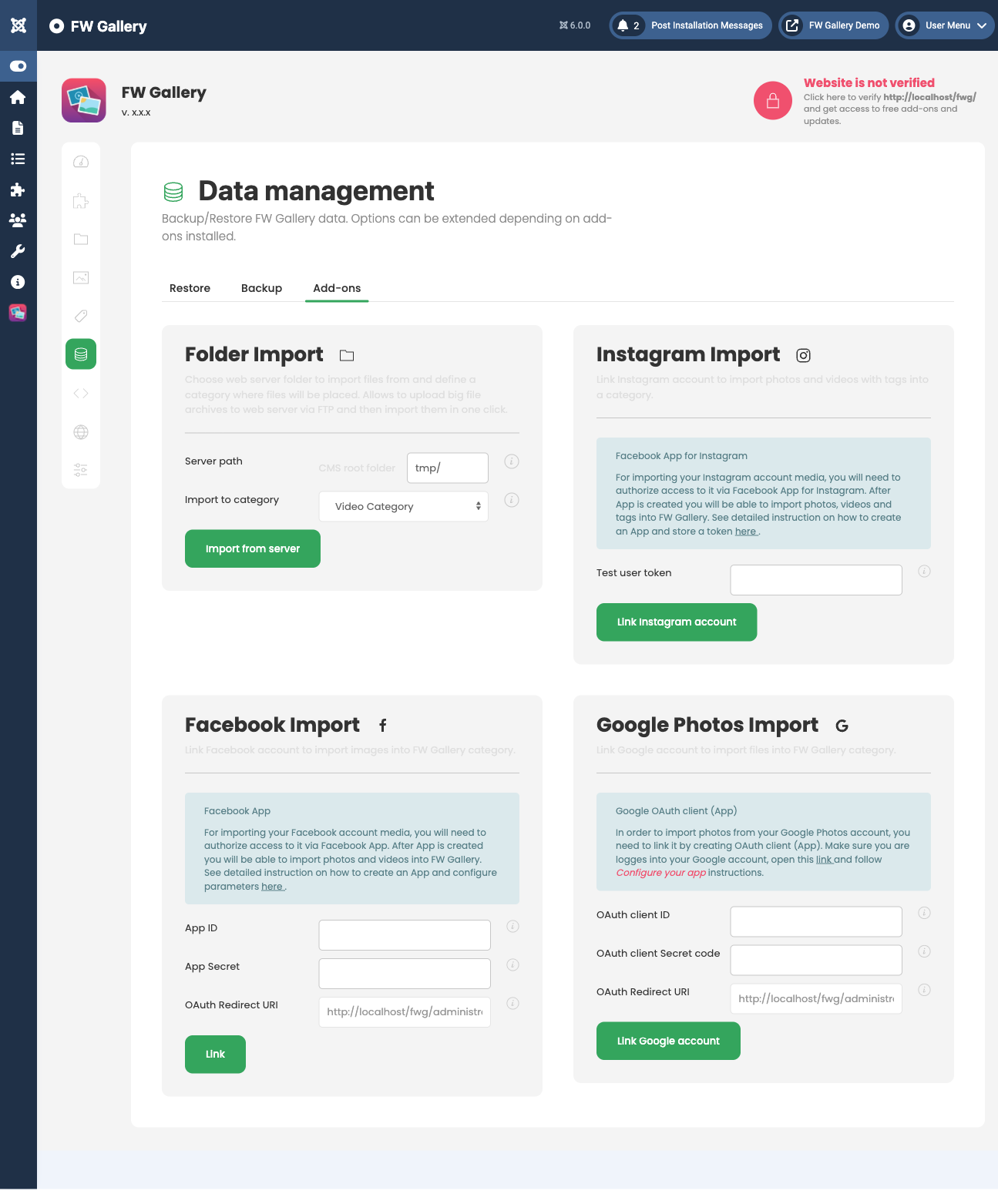
Once active, an import interface becomes available inside the FW Gallery admin panel under the Data section, and also from within any gallery's file list. Four import sources are supported:
- Server folder — batch-import images already on the server filesystem (uploaded via FTP or a server file manager).
- Facebook — import photos from a personal profile or a fan/business page album.
- Google Photos (Picasa) — import albums via Google OAuth.
- Instagram — import images using an Instagram access token.
Use Cases
- Bulk uploads — FTP hundreds of images to a server folder, then import them all in one operation.
- Social media sync — pull existing Facebook, Instagram, or Google Photos collections into your gallery.
- Migration — move image collections from other platforms into FW Gallery without manual re-uploading.
Using Folder Import
- Upload images to the configured import folder (for example, tmp/) via FTP or your server's file manager.
- Open the import interface in the FW Gallery admin panel under Data.
- Select the target gallery and start the import.
- Images are moved to the gallery storage folder and registered in the database.
Plugin Settings
Configure the Import plugin in Joomla Plugin Manager → FW Gallery - Import.
Folder Import
- Import root path — server folder path relative to the Joomla root that holds images to import. Default:
tmp.
Facebook Import
- Page type — choose between a personal profile or a fan/business page.
- Fan page name — Facebook page username, required when importing from a fan/business page.
- Facebook App ID — application ID from the Facebook Developers console.
- Facebook App Secret — application secret from the Facebook Developers console.
Google Photos (Picasa) Import
- Google App ID — Google OAuth client ID.
- Google App Secret — Google OAuth client secret.
Instagram Import
- Instagram Access Token — long-lived Instagram API access token.
Important Notes
- Social media imports require you to create developer API applications on Facebook, Google, or Instagram before entering credentials here.
- Instagram long-lived tokens can expire and must be renewed through the Instagram API when they do.
- For large folder imports, ensure your server's
upload_max_filesizeandmax_execution_timePHP settings are sufficient to handle the batch without timing out.
To install this addon, open the Add-ons panel inside FW Gallery. See Getting Started → Add-ons for details on free addons, paid addons, and site verification.
Was this article helpful?