 FW Real Estate – Documentation
SEO Booster
The SEO Booster add-on does two things for every property page: it builds readable URLs from the property's own details, and it outputs Google structured data so search engines understand what the page contains.
A URL ending in /riverside-loft-manchester-p95 does more work than one ending in ?id=95 — the words in it are indexed, and when someone pastes the link into a message it reads like a real address rather than a tracking code. Structured data is what promotes a plain blue link into a rich result with a price attached.
Use Cases
- Ranking on the search people actually type — a town, a property type, a price bracket — because those words appear in the URL.
- Rich results — structured data lets a search engine display the price and property details directly on the results page instead of a generic link.
- Shareable links — a readable URL gets clicked when pasted into a message or shared on social media. The page's title, description, and image that appear in a messenger preview are also governed by this add-on's head output.
Settings
Open Configuration → Add-ons → SEO Booster to configure the add-on.
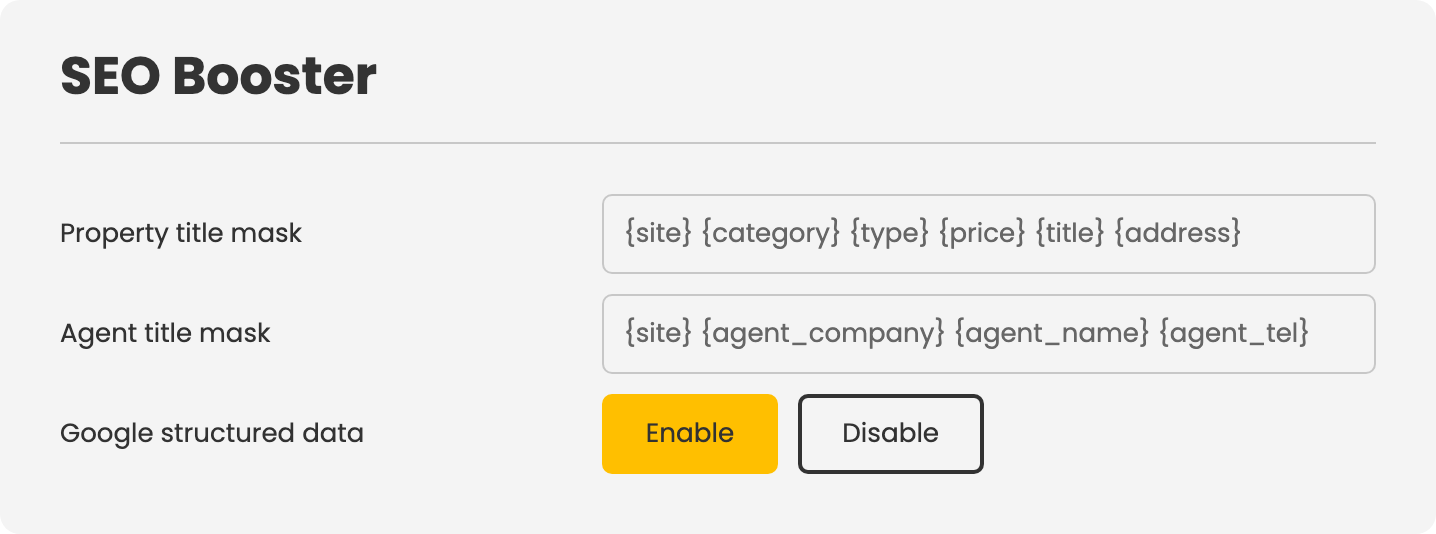
Property Title Mask
The pattern each property URL is built from. Combine placeholders in any order, separated by hyphens or other characters of your choice.
{title}— the property's title{address}— its address{category}— its categories{type}— its property types{price}— its price{site}— the site name
Agent Title Mask
The same principle applied to agent profile URLs. Available placeholders: {agent_name}, {agent_company}, and {site}.
Google Structured Data
Switches structured data output on or off for property pages and listings. Enable this to give search engines the machine-readable signals needed to produce rich results.
How the URLs Behave
The ID stays authoritative. The readable segment of the URL is for people and search engines; the property itself is located by its ID. Renaming a property or changing the mask never breaks an existing link — the old URL still resolves to the correct property.
Leaving a mask empty keeps URLs in their plain form. Nothing breaks; you simply do not get the readable segment.
Notes
- Choose a mask and keep it. Changing it later does not break links, but the same property becomes reachable at two readable paths, which is untidy even where it is harmless.
- Shorter is usually better. A mask that combines title, address, category, type, and price produces a URL nobody will read. Two or three placeholders is where readable URLs actually help.
- Shared link previews — what appears when a link is pasted into a messenger or social network — come from the page title, description, and image that this add-on's head output controls alongside the structured data.
To install this addon, open the Add-ons panel inside FW Real Estate. See Getting Started → Add-ons for details on free addons, paid addons, and site verification.