CSV Import/Export
Editing two hundred prices in a web form is a day's work and a source of mistakes. In a spreadsheet it is ten minutes. The CSV Import/Export add-on is what makes a large portfolio maintainable at all — export the columns you want, edit them in Excel or Google Sheets, and feed the file back in.
Use Cases
- Moving a portfolio in. Bring an existing catalogue onto the site in one pass instead of typing every property.
- A price round. Export
idandprice, edit the column, re-import. - Bulk edits of anything. Reassign an agent, restate areas, correct a town's spelling everywhere.
- A readable backup. An export is a plain file you can open, keep, and check.
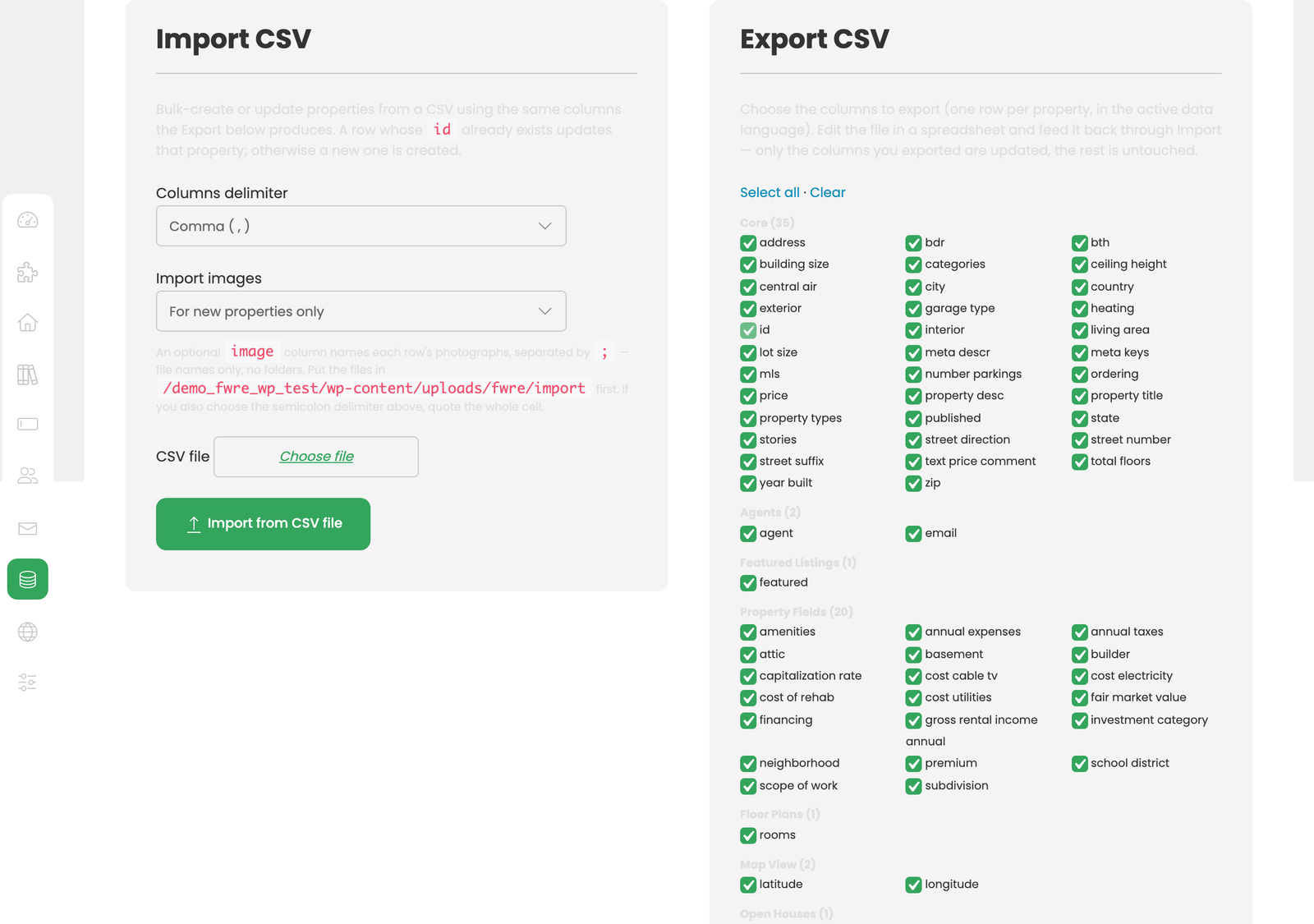
Both the Import and Export tools live on FW Real Estate → Data Management.
Export
Choose the columns you want and you receive one row per property, in the active data language. Every add-on you have enabled contributes its own columns — custom fields, room data, open-house slots, and so on — so an export reflects the site you actually have.
Import
The import accepts the same columns the export produces. Two rules govern everything:
- A row whose
idalready exists updates that property. An export → edit → import round trip is an update, not a duplicate. - Only the columns present are updated. Everything else on the property is left untouched.
That second rule is what makes partial work safe. Export just id and price, change the prices, import the file, and nothing else on those properties is at risk.
Photographs
An import can bring photographs with it — the only way to load a catalogue in bulk without a feed. Two steps are required:
- Put the image files in the import folder. The Import panel shows its exact path; you can reach it with your file manager or over FTP.
- Name them in an
imagecolumn, separated by semicolons:front.jpg;kitchen.jpg;garden.jpg. They appear in the gallery in that order.
Use bare file names only — front.jpg, never photos/front.jpg or ../front.jpg. Any name containing a folder separator is refused and counted as a photograph that did not import.
Semicolons, not commas. Inside a CSV a comma separates columns, so a comma-separated list survives only while the cell stays quoted — and a spreadsheet will eventually drop those quotes. If you also chose the semicolon column delimiter, quote the whole cell.
The Import images control determines what happens when a row is imported again:
- For new properties only (default) — a property that already has photographs is left alone, so re-running a sheet does not re-copy everything.
- Re-fetch on every run — the named files are copied again, replacing what is already stored.
A photograph is stored under its file's name, so re-importing the same file replaces the same image rather than adding a copy. The image format is read from the file itself, so a mislabelled extension does no harm.
Photographs are import-only — there is no image column in the export. A CSV cannot carry the pictures it would be naming. To take photographs with you, use the backup in Data Management, which includes them.
The result line counts properties and photographs separately on purpose. A photograph that cannot be read never costs you the property row, which is already saved. Photographs not imported: 3 means three files were missing from the import folder or were not readable images — the property rows went in regardless.
Notes
- Export first, always — even when importing from an external source. The exported file is the definitive statement of what your columns are called and what the values look like on your site.
- Take a backup before a large import. An import that updates the wrong column updates it everywhere, and there is no undo.
- Try five rows first. Import a small batch, check the results, then import the rest.
- Spreadsheets damage data quietly. Long reference numbers become scientific notation and leading zeroes vanish from postcodes. Set those columns to Text before editing and check them afterwards.
- The data language matters. An export carries the active language's values and an import writes to it — switch to the correct language before either operation.
- Upload photographs before the sheet. The import reads the folder at the moment it runs; a file that arrives afterwards is not picked up until you import that row again.
To install this addon, open the Add-ons panel inside FW Real Estate. See Getting Started → Add-ons for details on free addons, paid addons, and site verification.