Map View
Map View adds everything location-related to FW Real Estate: a map on every property page, a Map listing layout, address-to-coordinates geocoding when a property is saved, radius search, and travel-time areas. Most property searches are really about location — a buyer rarely wants "a three-bedroom house" in the abstract; they want one near a school, a station, or their workplace. This add-on is what lets them ask that question.
Use Cases
- Browsing by area. The Map layout turns the listing into a canvas of markers, so visitors explore the way they think — by where, not by filter.
- Understanding the neighbourhood. The map on the property page answers "where is this, actually?" in a way no written description can.
- "Within 25 miles of…" Radius search finds everything around a place the visitor names, including the next town over — which a city filter would have excluded.
- "Can I get to work in 20 minutes?" Travel-time areas shade what is reachable from the property on foot, by bike, or by car.
API Keys — Read This Before Purchasing
Maps are a paid third-party service. The API keys are yours, purchased directly from Google or Mapbox. Which keys you need depends on which features you enable.
| Key | What it is for |
|---|---|
| Google Maps API key | Drawing the map in the visitor's browser. Restrict this key to HTTP referrers (websites) with your site's address. |
| Google geocoding key | Turning an address into coordinates when a property is saved. This request comes from your server — not from a browser — so this must be a separate key restricted by IP address. A referrer-restricted key silently refuses every geocoding request. |
| Mapbox API key | Required when the map provider is set to Mapbox instead of Google. |
| Isochrone Mapbox key | Travel-time areas are a Mapbox service. On a Mapbox site the map key covers this; on a Google site you need this additional key. |
The two Google keys cannot be the same key. This is the single most common reason maps "stop working." One key restricted to HTTP referrers draws maps correctly but silently refuses every server-side geocoding call, so addresses never receive coordinates and properties never appear on the map. Always create two separate keys with the correct restrictions for each.
Settings
All Map View settings are found in Configuration → Add-ons → Map View.
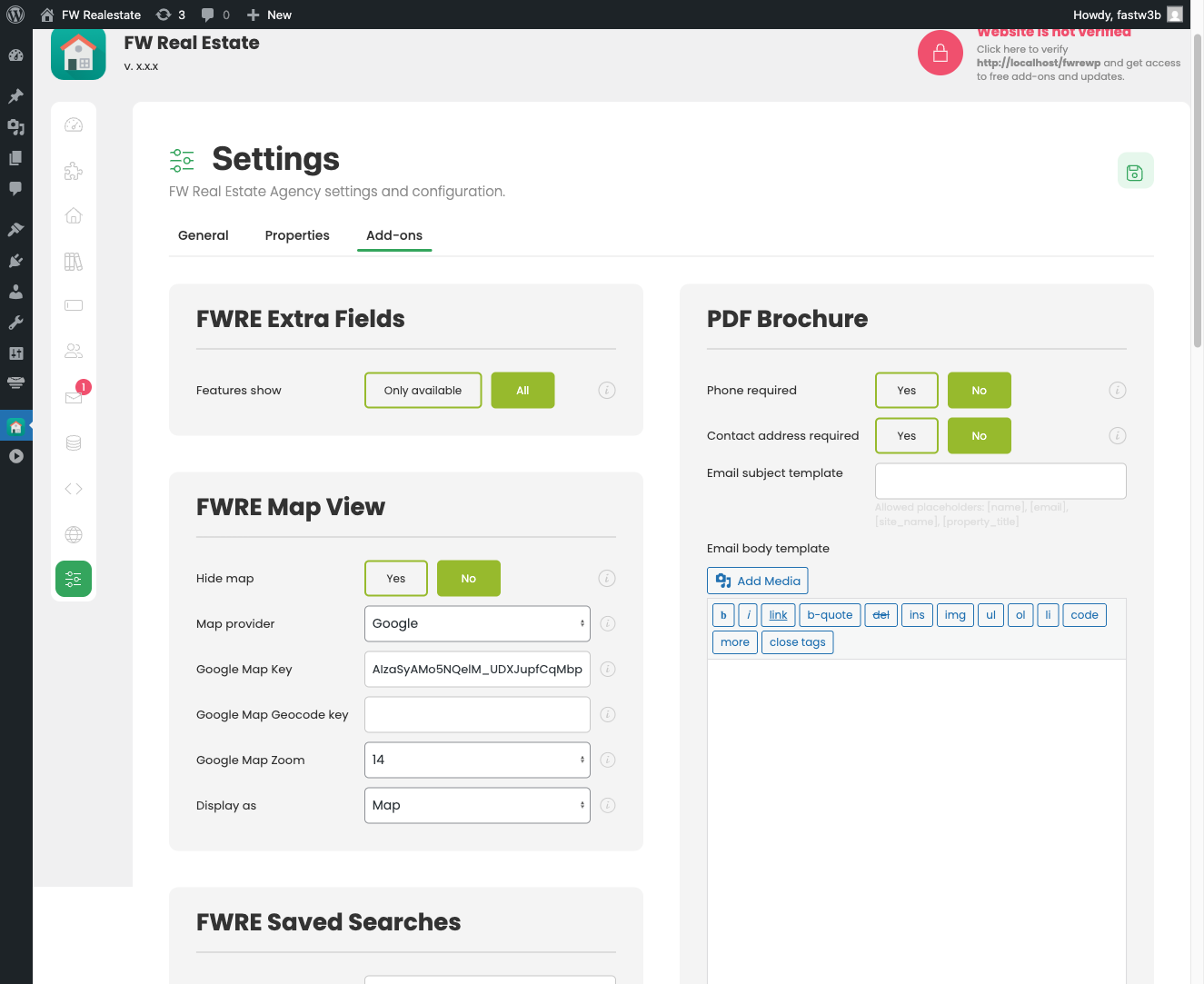
| Setting | Default | Description |
|---|---|---|
| Hide the map | No | Removes the map from every property page without disabling the add-on — useful while resolving a billing issue on a key, since the Map layout and radius filter remain available. |
| Map provider | Choose Google Maps or Mapbox. | |
| Google Maps API key | — | Browser-side map rendering. Restrict by HTTP referrer. |
| Google geocoding key | — | Server-side address lookup. Restrict by IP address. Must be a different key from the Maps API key. |
| Google Maps zoom | 14 | Opening zoom level (10–19). |
| Mapbox API key | — | Required when the provider is Mapbox. |
| Mapbox zoom | 15 | Opening zoom level for Mapbox (14–19). |
| Travel-time areas | Off | Enables the isochrone panel beneath the property map. |
| Travel times (min) | 5, 10, 15, 20 | Which travel-time options the panel offers to visitors. |
| Isochrone Mapbox key | — | Only needed when the map provider is Google and travel-time areas are enabled. |
| Display as | Map | Whether the map opens in Map or Satellite view by default. |
Setting a Property's Coordinates
The property edit form includes an embedded map. Coordinates can be set three ways:
- Type the address — it is geocoded automatically when you save the property (requires the geocoding key).
- Drag the marker to the exact spot — useful for properties where the street address alone does not pin the location precisely.
- Type the latitude and longitude directly into the coordinate fields.
The properties list flags any record with no coordinates with a warning icon, so unmapped properties are visible to you in the admin before a visitor discovers them.

The Map Listing Layout
With Map View enabled, a Map layout becomes available in the listing's layout switcher on the front end. You can also set it as the default by selecting Map in the Layout option of the FW Real Estate — Listing block, or by using the layout attribute of the shortcode: [fw_real_estate layout="map"]. If the add-on is disabled, the Map layout disappears from all of these options and any page already set to it falls back to the list layout.
The Map layout displays all results as markers on a map. Clicking a marker opens a mini card showing the photo, title, and price.

The Property Page Map and Travel-Time Panel
Every property page shows an embedded map with the property's marker. With Travel-time areas turned on in settings, a panel beneath the map lets the visitor choose walking, cycling, or driving and a number of minutes, then shades the area reachable in that time from the property.